


Table of Contents
- Why Write Your Own
- What You Need Before Starting
- The Anatomy of an MCP Server
- Tools vs Resources vs Prompts
- Step 1: Pick Your Transport
- Step 2: Scaffold the Server
- Step 3: Define Your First Tool
- Step 4: Write Descriptions That Actually Work
- Step 5: Handle Errors Properly
- Step 6: Connect and Test
- Beyond the First Tool
- A Test Set for Your Server
- If You Decide to Share It
- Security You Cannot Skip
- Seven Mistakes First-Timers Make
- What It Costs to Run
- Frequently Asked Questions
- Final Thoughts
There is a moment, a few hours into building your first MCP server, when the assistant calls a tool you wrote, gets real data from your own system, and answers a question it had no business being able to answer. It is a slightly disproportionate thrill for what is essentially a wrapper around an API call.
It is also the fastest way to understand the protocol. You can read the specification twice and still be vague about it. Build one small server and it becomes obvious.

Why Write Your Own
With over twenty thousand servers available, the honest question is why bother. Three good reasons.
Your system is internal. Nobody has written an MCP server for your company’s inventory API, your bespoke database schema, or the legacy system nobody talks about. If it is not public, it does not exist in any directory.
Existing servers do too much. A community server exposing forty tools when you need three is not a convenience – it is noise in every tool-selection decision your assistant makes. Three well-described tools frequently outperform forty vague ones.
You want to understand the protocol. An afternoon building an MCP server teaches you more than a week of reading, and the understanding transfers to every server you evaluate afterwards.
If you are still deciding whether to build or install, our roundup of the best MCP servers covers what already exists, and our guide to how MCP works covers the concepts underneath this tutorial.
What You Need Before Starting
Less than you might expect.
A language with an official SDK. The official documentation lists them all. TypeScript, Python, Go and C# are all Tier 1, with Rust in beta. Pick whichever you already write – there is no meaningful advantage between them for a simple server.
Something worth exposing. An API you call regularly, a database you query, a script you run. Resist starting with something abstract. The best first MCP server wraps a thing you already do by hand.
An MCP-compatible client to test against. Whichever AI tool you already use is almost certainly one.
That is it. No account, no registration, no hosting.
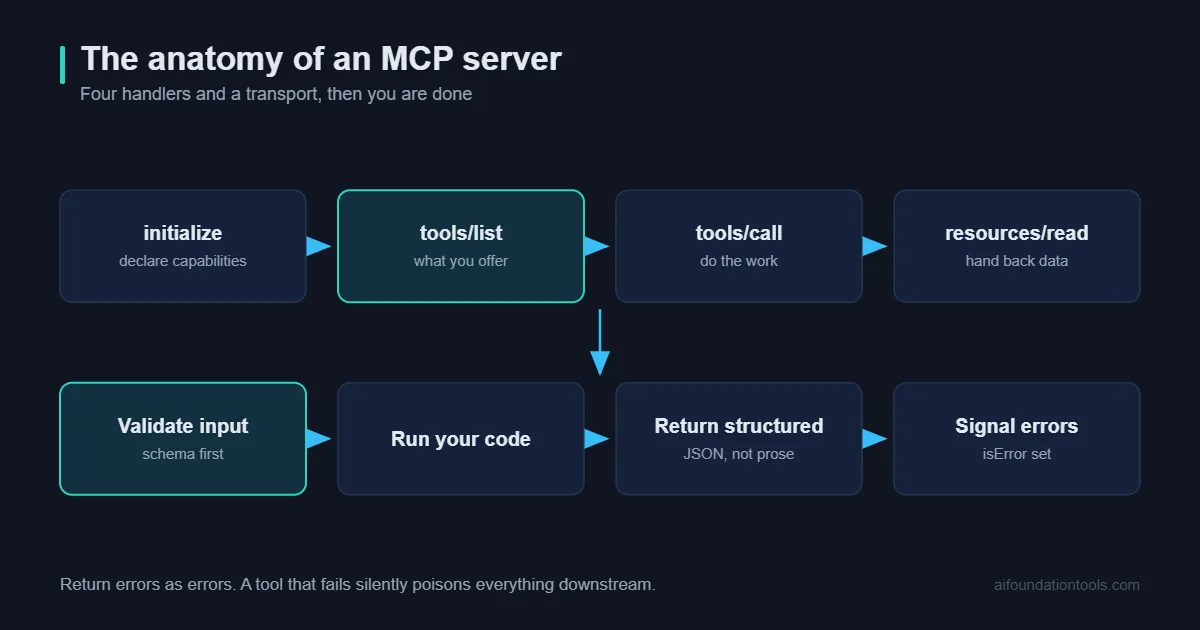
The Anatomy of an MCP Server
Every MCP server, regardless of complexity, has four parts.
Metadata. A name and version. Two lines.
Capability declarations. What the server offers – tools, resources, prompts, or some combination.
Handlers. The functions that run when something is called.
A transport. How the client talks to it.
The three primitives are worth getting right conceptually before you write anything. Tools are actions the model chooses to invoke – anything with a consequence belongs here. Resources are data the application exposes for context. Prompts are templates a user triggers deliberately.
Most first servers are entirely tools. That is fine. Putting a read-only lookup behind a tool rather than a resource is a common early choice and rarely causes problems.
Tools vs Resources vs Prompts
Choosing the wrong primitive is the most common design mistake in a first MCP server, and the distinction is easy once seen side by side.
| Tools | Resources | Prompts | |
|---|---|---|---|
| Who decides to use it | The model | The application | The user |
| Typical example | Search orders, create ticket | A file, a record, a spec | A saved workflow template |
| Has side effects | Often | No | No |
| Surfaces as | An invocable function | Context attached to the request | Usually a slash command |
| Use when | An action needs taking | Context should always be present | A human triggers a repeatable task |
The practical rule: if it changes something, it is a tool. If it is background the model should always have, it is a resource. If a person deliberately triggers it, it is a prompt. When genuinely unsure, start with a tool – it is the easiest to move later.
Step 1: Pick Your Transport
Two options, and the choice is usually obvious.
Standard input and output runs the server as a local process launched by the client. Credentials live in your own config and never travel. This is the right default for anything personal, anything touching local files, and anything sensitive.
HTTP runs the server as a hosted service reached over the network with OAuth. Right when you are offering the server to other people or a whole team.
Start with stdio. It is simpler, it requires no hosting, and you can move to HTTP later without rewriting your handlers. One note: the mid-2026 specification made the protocol stateless, which mainly matters for remote servers – it means requests can land on any instance behind a load balancer rather than needing sticky sessions.
Step 2: Scaffold the MCP Server
Install the MCP server SDK for your language from the MCP GitHub organisation and create a server instance with a name and version. The SDKs handle the protocol negotiation, message framing and error formatting – you are writing handlers, not implementing a wire format.
At this point you have a valid MCP server that does nothing. Run it. If it starts without errors, the plumbing works and everything after this is your own logic.
Worth doing before adding anything: connect this empty server to your client and confirm it appears. Debugging an empty server is trivial. Debugging a server with three half-finished tools is not.
Step 3: Define Your First Tool
A tool needs three things: a name, a description, and an input schema.
The name should be a verb phrase – search_orders, get_customer, create_ticket. The schema defines the parameters, their types, and which are required. The SDKs use JSON Schema, and the more precisely you define it, the fewer malformed calls you will handle.
Then write the handler. It receives validated arguments, does the work, and returns content. For a first MCP server this is frequently a single API call and a formatted response.
Two things to get right immediately. Return structured, readable output – a clean summary beats a raw JSON dump the model has to parse. And keep responses small; every token you return costs money and dilutes attention. Returning fifty results when the useful answer is three is a common and expensive habit.
Step 4: Write Descriptions That Actually Work
This is the part that decides whether your MCP server is good, and it is not code.
The description is what the model reads when deciding whether to call your tool. It is the entire interface. A vague description produces a tool that never gets used, or gets used at exactly the wrong moment.
Write descriptions the way you would document an API for a colleague joining next week. State what it does, when to use it, what it returns, and – importantly – what it does not do. That last part prevents more misfires than anything else.
Compare “Gets data from the system” against “Searches customer orders by email address or order number. Returns up to 10 matching orders with status, date and total. Does not include refunds or draft orders.” The second one is usable. The first is a coin flip.
The same applies to parameter descriptions. If a date needs a specific format, say so in the schema description rather than hoping.
Step 5: Handle Errors Properly
Errors in an MCP server are not exceptions to swallow – they are messages to the model, and how you phrase them determines whether it recovers.
Return errors as content the model can read and act on. “No customer found with that email address. Try searching by order number instead.” is dramatically more useful than a stack trace or a generic failure, because the model can follow the suggestion.
Three specific cases worth handling explicitly: invalid input where you can say what was expected, empty results which are not errors but need to be unambiguous, and upstream failures where the model should know to retry rather than assume the answer is no.
Step 6: Connect and Test the MCP Server
Add your MCP server to your client’s configuration – typically a JSON file listing the command to run and any environment variables. Restart the client and your tools should appear.
Then test the MCP server deliberately rather than casually.
Ask something that should obviously use your tool. Confirm it gets called with sensible arguments.
Ask something ambiguous. This is where poor descriptions reveal themselves – watch whether it calls your tool when it should not.
Ask something with no answer. Confirm the empty result is handled cleanly rather than producing an invented one.
Break it deliberately. Pass bad input, disconnect the upstream service. Recovery behaviour is what separates a demo from something you rely on.
Beyond the First Tool
Once one tool works, three additions are worth making before you call the MCP server finished.
Pagination. Any tool that can return many results needs a limit and an offset, plus a clear note in the response when more exist. Without this, a broad query dumps two hundred records into context and the useful part disappears.
A read-then-write pair. If your server can change something, split it – one tool that shows what would change, one that applies it. The model can then confirm before acting, and you have a natural approval point.
Filtering at the source. Push constraints into your query rather than fetching everything and filtering in the handler. It is faster, cheaper, and it keeps responses small.
Beyond that, resist scope creep. An MCP server that does one thing precisely is more useful than one that does eight things approximately, because tool selection accuracy falls as the catalogue grows.
A Test Set for Your Server
The same discipline that makes retrieval systems reliable applies here. Write down fifteen realistic requests, with the tool call each should produce.
Include the awkward cases: a request that should use your tool but phrases it unusually, one that superficially sounds like your tool but should not trigger it, and one with missing information where the model should ask rather than guess.
Run the set after every change to a description or schema. Description edits feel harmless and frequently change behaviour in ways you would not predict – a tool that was called reliably can stop being called after a wording change that seemed like an improvement.
This takes twenty minutes to set up and it is the difference between an MCP server you trust and one you keep second-guessing.
If You Decide to Share It
Publishing changes the standard. A server used only by you can be rough; one other people install is a dependency in their setup.
Three things become non-negotiable. A clear README stating exactly what it accesses and which permissions it needs – people should be able to assess the risk without reading your code. Explicit versioning, so a breaking change does not silently break someone else. And responsiveness to the specification, because a server left untouched through a protocol revision will eventually stop working against updated clients.
Also worth saying plainly: if your server wraps internal company systems, keep it private. There is no expectation that every MCP server becomes public, and a repository exposing your internal API surface is not a contribution to the ecosystem.
Security You Cannot Skip
Your MCP server runs with your permissions and holds your credentials. A few rules that matter more than the code.
Scope credentials narrowly. Read-only where the job allows. A separate token per server, revocable independently.
Never interpolate model input into queries or commands. The OWASP LLM Top 10 covers why this matters. Treat arguments as untrusted, because ultimately they originate from text a model generated, possibly influenced by content it read. Parameterise everything.
Keep write operations deliberate. Anything irreversible – sending, deleting, spending – deserves a confirmation step rather than direct execution.
Do not put secrets in tool descriptions. They are visible to the model and to anyone inspecting the server.
Log what gets called. When something behaves oddly, the trace is what tells you whether the model chose badly or your handler misbehaved.
Seven MCP Server Mistakes First-Timers Make
1. Too many tools in version one. Start with one. Add the second when the first works properly.
2. Vague descriptions. The single biggest determinant of quality, and the one people spend least time on.
3. Returning everything. Large responses cost tokens and bury the useful part. Summarise, paginate, cap.
4. Loose input schemas. Accepting any string means handling any string. Constrain types and enumerate options where you can.
5. Silent failures. A tool returning nothing on error teaches the model that your tool is unreliable, and it stops calling it.
6. Building for hypothetical needs. Wrap what you actually do by hand, not what you imagine someone might want.
7. Skipping the empty-server test. Confirm connection before adding logic. It takes two minutes and saves an hour of ambiguous debugging.
What It Costs to Run
Almost nothing, which is worth stating because people assume otherwise.
A local MCP server is a process on your machine. No hosting, no subscription, no per-call fee. The only real cost is tokens: every tool you expose adds its definition to the context of each request, so a server with twenty tools is quietly charging you on every call even when none are used.
That is the practical argument for keeping your MCP server focused. Three precise tools cost less and perform better than twenty loose ones – the model chooses more accurately and you pay less per request. It is unusual for the cheap option and the good option to be the same, and here they are.
Frequently Asked Questions
How long does building an MCP server take?
A first server wrapping one API is genuinely an afternoon. Something with several tools, good error handling and tested descriptions is a few days.
Which language should I use?
Whichever you already write. TypeScript, Python, Go and C# all have Tier 1 SDKs with comparable capability.
Do I need to host it?
Not for personal use. A stdio server runs locally, launched by your client. Hosting only matters when other people need access.
Can I publish it?
Yes, and if it wraps a public service others will use it. If it wraps your internal systems, keep it private – there is no obligation to share.
How do I handle authentication?
For local servers, environment variables holding scoped tokens. For remote servers, OAuth, with issuer validation now required by the specification.
What breaks most often?
Protocol version mismatches after a client update, expired credentials, and tools that were never called because their descriptions were unclear. The third is the most common and the least obvious.
Should tools or resources hold my data?
If the model should decide when to fetch it, make it a tool. If the application should always provide it as context, make it a resource. When unsure, start with a tool.
Final Thoughts
The surprising thing about building an MCP server is how little of the work is code. The SDK handles the protocol. Your handler is usually a function you could have written in any context.
What actually determines whether it is good is the part that looks like documentation – naming tools clearly, describing them precisely, returning readable output, failing in ways the model can act on. Those are writing problems more than engineering ones.
Pick the API you call most often by hand. Wrap one endpoint. Connect it, use it for a week, and you will know exactly what your second tool should be.
Once your server is running, the next question is what calls it. See AI agent frameworks compared for the orchestration layer.
[…] their own integrations, this is also a reference implementation worth looking at. Our guide to building your own MCP server covers the pattern, and the best MCP servers tracks what else is […]