

Table of Contents
- Why Self-Host at All
- The Cost Comparison Nobody Does Honestly
- How Much Server You Actually Need
- Choosing a Provider
- Docker, npm or Kubernetes
- SQLite vs PostgreSQL
- The Deployment, Step by Step
- Queue Mode and Scaling
- Security You Cannot Skip
- Backups and Upgrades
- Monitoring That Tells You Something
- Getting More From the Server You Have
- Seven Mistakes That Cause Outages
- When to Go Back to Cloud
- Final Thoughts
- Frequently Asked Questions
The advice you usually get about self-hosting n8n is “spin up a small VPS and run the Docker command.” That works perfectly until the day it does not, which is typically the day a workflow starts processing files, or an AI node holds a connection open for ninety seconds, or you cross about two hundred executions an hour.
Then the container gets killed by the kernel, executions vanish, and you spend an evening learning about memory limits.
This guide is about avoiding that evening. Self-hosting n8n is not hard, but it is unforgiving about a few early decisions. It covers what self-hosting n8n actually demands from a server, how to size one properly, and the handful of decisions that are painful to change later.
Why Self-Hosting n8n Is Worth It
Four reasons hold up. The rest are rationalisation.
Execution volume economics. Hosted plans price by executions. Self-hosting n8n prices by server. Below a few thousand executions a month, cloud is cheaper once you count your own time. Above that, the curves cross decisively and keep diverging – and AI agents multiply executions because every tool call is another step.
Data that cannot leave. If workflows touch customer records, health data or anything under a residency requirement, self-hosting stops being an optimisation and becomes the only option.
Access to internal systems. Databases behind a firewall, internal APIs, on-premise file shares. A cloud instance cannot reach them without you punching holes you probably should not punch.
No artificial limits. Execution timeouts, payload sizes, concurrency caps. Self-hosted, the only limits are the ones your hardware imposes.
If none of these apply to you, use the cloud version. Genuinely. Running infrastructure to save a modest subscription is a bad trade when you price your own weekends.
The Cost Comparison Nobody Does Honestly
Server cost is the small part. The full picture has three components.
Infrastructure. Predictable and cheap. A capable VPS runs a serious workload for less than most SaaS seats.
Setup time. A first deployment done properly – reverse proxy, SSL, database, backups, monitoring – is a solid day if you have done it before and two or three if you have not.
Ongoing maintenance. The part that gets omitted. Security updates, version upgrades, disk filling with execution data, the occasional 3am restart. Call it a few hours a month in steady state, more when you upgrade.
Self-hosting n8n wins on a two-year view for most teams with real volume. It loses badly if nobody owns it. An unmaintained automation server is not a saving, it is an incident waiting for a quiet weekend.
Self-Hosting n8n: How Much Server You Actually Need
This is the part of self-hosting n8n people skip and then regret. Sizing depends far more on what your workflows do than how many you have.
| Workload | vCPU | RAM | Disk | Database |
|---|---|---|---|---|
| Personal, a few dozen executions a day | 1 | 2 GB | 20 GB | SQLite |
| Small team, light API workflows | 2 | 4 GB | 40 GB | PostgreSQL |
| Production, AI nodes, moderate volume | 4 | 8 GB | 80 GB | PostgreSQL |
| Heavy – file processing, agents, high concurrency | 8 | 16 GB | 160 GB+ | PostgreSQL, queue mode |
Three rules that override the table.
RAM is the constraint, not CPU. n8n holds workflow data in memory during execution. A workflow processing a 50MB file needs several times that in headroom. Out-of-memory kills are the most common self-hosting n8n failure by a wide margin.
AI nodes change the maths. An agent that calls three tools holds an execution open for the duration of all of them. Ten concurrent agent runs is a very different memory profile from ten webhook calls. If you are running n8n AI agents, size up a tier from what the table suggests.
Disk fills faster than you expect. Every execution stores its data. Without pruning, a busy instance will fill a small disk within months.
Choosing a Provider
Any competent VPS provider can run a self-hosting n8n deployment. The differences that matter are less about brand than about four specifics.
Dedicated versus shared CPU. Shared vCPU is fine for light use and will throttle you under sustained load. If workflows run continuously, pay for dedicated cores.
Disk type. NVMe over SATA SSD, particularly if you are running PostgreSQL on the same box.
Bandwidth policy. Some providers charge egress aggressively. If workflows move files, check before you commit.
Snapshot support. Being able to snapshot before an upgrade turns a risky operation into a reversible one. This is worth more than a slightly cheaper monthly rate.
Avoid the smallest tier of any provider for anything you depend on. The saving is trivial and the memory ceiling is the exact thing that will bite you.
Self-Hosting n8n With Docker, npm or Kubernetes
Docker Compose. The right answer for almost everyone. Reproducible, upgradeable by changing a tag, isolated from the host. Use this unless you have a specific reason not to.
npm install. Simplest to start, worst to maintain. Node version conflicts, permission problems, and upgrades that break in interesting ways. Fine for a laptop experiment.
Kubernetes. Correct only if you already run Kubernetes and have people who operate it. Otherwise you have taken one maintenance burden and replaced it with a larger one.
The self-hosting n8n community has largely standardised on Docker Compose for good reason. Follow the crowd here.
SQLite vs PostgreSQL
n8n defaults to SQLite, which is genuinely fine for personal use and genuinely wrong for anything shared.
SQLite is a single file with a single writer. Under concurrent executions you will see database locks, and locked executions fail in ways that are tedious to diagnose. It also makes queue mode impossible.
Use PostgreSQL for anything anyone else depends on. Migrating later is possible and unpleasant – it is the decision most worth getting right at the start. Run it as a second container in the same Compose file and give it a named volume.
The Deployment, Step by Step
- Provision and harden the server. Create a non-root user with sudo, disable password authentication in favour of SSH keys, enable a firewall allowing only SSH, HTTP and HTTPS.
- Install Docker and the Compose plugin. Use the official repository rather than the distribution package, which is often well behind.
- Point a domain at the server. An A record for something like automation.yourdomain.com. Do this before requesting certificates.
- Write the Compose file. Three services: n8n, PostgreSQL, and a reverse proxy. Named volumes for the n8n data directory and the database.
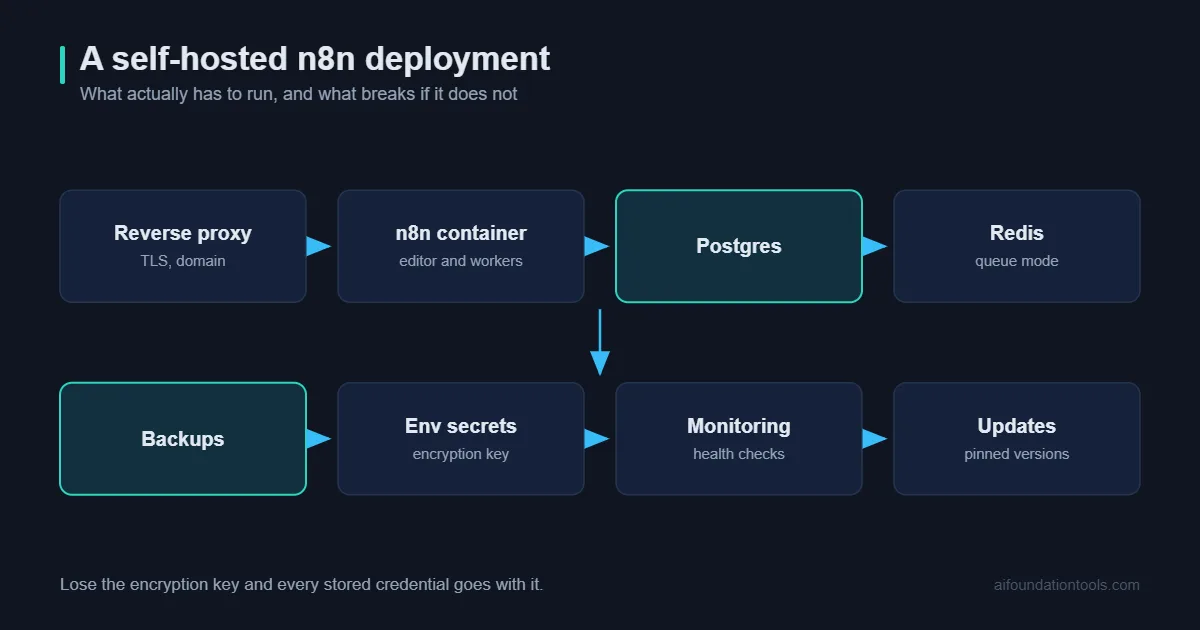
- Set the environment variables that matter. The webhook URL and host must match your real domain or webhooks will register incorrectly. Set the timezone. Set an encryption key and record it somewhere safe – lose it and every stored credential becomes unreadable.
- Put a reverse proxy in front. Caddy is the least effort because it handles certificates automatically. Nginx with certbot works equally well if you already know it.
- Enable authentication immediately. An n8n instance reachable on the open internet without authentication is a credential store waiting to be found.
- Configure pruning. Set execution data retention now, not after the disk fills.
- Test a webhook end to end. From outside the network. This catches proxy and URL misconfiguration immediately.
Queue Mode and Scaling
Default n8n runs everything in one process. Queue mode splits it into a main instance that receives triggers and separate worker processes that execute, coordinated through Redis.
You need it when executions start queueing behind each other, when one long-running workflow blocks everything else, or when you want to survive a worker crash without losing the queue.
You do not need it below a few hundred executions an hour. Adding Redis and multiple workers to a quiet instance is complexity with no return.
When you do enable it, scale workers horizontally rather than making one enormous instance. Two four-gigabyte workers handle concurrency better than one eight-gigabyte worker.
Self-Hosting n8n Security You Cannot Skip
Your n8n instance holds credentials for everything it touches. Treat it accordingly.
- Never expose it without authentication. Not “temporarily”. Not “it is an obscure domain”.
- Back up the encryption key separately from the database. Both together in one backup defeats the point.
- Restrict the database. PostgreSQL should listen only on the Docker network, never on a public interface.
- Scope every credential narrowly. Read-only where possible. An automation account rarely needs admin rights, though it is almost always given them.
- Keep it updated. Both the operating system and n8n. Automate security updates on the host.
- Consider network restriction. If only your team needs access, a VPN or IP allowlist in front of the proxy removes an entire class of risk.
Backups and Upgrades
A self-hosting n8n backup has three parts: the PostgreSQL database, the n8n data volume, and the encryption key. Miss the last one and the other two are useless.
Automate a nightly database dump to off-server storage. A backup sitting on the same disk as the thing it protects is not a backup.
For upgrades: snapshot the server, back up the database, change the image tag, restart, verify. Read the release notes first – n8n occasionally introduces breaking changes, and finding out through a failed production workflow is the expensive way.
Pin a specific version rather than tracking latest. Automatic upgrades on an automation server that other systems depend on is an unnecessary source of surprise.
Monitoring That Actually Tells You Something
The failure mode of self-hosting n8n is rarely dramatic. It is a workflow that stopped firing three weeks ago and nobody noticed until a customer asked why they never got their invoice.
Four things are worth watching, and all four can be set up in an afternoon.
Is the instance up. An external uptime check hitting your health endpoint every minute. External matters – a monitor running on the same server tells you nothing when the server is the problem.
Did workflows fail. n8n can trigger an error workflow whenever any execution fails. Point it at Slack or email. This is the single highest-value monitoring you can add to a self-hosted n8n deployment and it takes about ten minutes.
Is anything still running. A workflow that should fire hourly and has not fired since Tuesday will not raise an error, because it is not erroring – it is simply absent. A heartbeat workflow that pings a dead-man’s-switch service catches this class of silent failure.
Resource headroom. Memory and disk, with alerts before they are critical rather than after. Both failure modes in self-hosting n8n are gradual and both are trivially preventable with a warning at eighty percent.
Getting More Out of the Server You Have
Before upgrading hardware, check whether the workload is the problem. Several common patterns waste resources badly.
Pulling more data than you use. A node that fetches a thousand records so a filter can discard nine hundred and ninety is a memory problem disguised as a logic problem. Filter at the source with API query parameters.
Processing large files in memory. Streaming to disk, working there, then cleaning up uses a fraction of the RAM. This one change has rescued more undersized self-hosting n8n instances than any hardware upgrade.
Running everything on a schedule. Polling every minute when the source system supports webhooks wastes executions continuously. Webhooks are cheaper and faster.
Storing full execution data on high-volume workflows. You can reduce what gets saved per workflow. On a chatty integration that runs thousands of times a day, this alone can halve disk growth.
Leaving old workflows active. Deactivate what you are not using. Inactive workflows cost nothing; forgotten active ones consume resources and occasionally do something unwelcome.
Work through that list before buying a bigger server. In most cases self-hosting n8n on modest hardware is entirely viable once the obvious waste is removed.
Seven Mistakes That Cause Outages
1. Undersizing memory. The single most common cause of self-hosting n8n failures. Symptoms look random; the cause is the kernel killing the container.
2. Staying on SQLite. Works in testing, locks under real concurrency.
3. No execution pruning. Disk fills, everything stops, and the cause takes an hour to find.
4. Wrong webhook URL. Webhooks register with whatever host n8n believes it has. Mismatch it and external services call an address that does not exist.
5. Losing the encryption key. Every credential must be re-entered by hand. This is a genuinely bad day.
6. No monitoring. A workflow that has been silently failing for three weeks is worse than one that never ran. Uptime checks plus failure notifications are an hour of setup.
7. One person knows how it works. Document the deployment. The bus factor on self-hosted infrastructure is a real operational risk.
When to Go Back to Cloud
Worth saying plainly: self-hosting n8n is not a permanent commitment or a badge of seriousness.
Move back if nobody owns maintenance, if you are spending more on your own hours than the subscription would cost, or if the person who built it has left. There is no prize for running your own server, and a well-maintained cloud instance beats a neglected self-hosted one on every metric that matters.
The decision should be revisited annually rather than treated as permanent. If you are still deciding whether n8n is the right platform in the first place, our overview of n8n as an automation platform covers that question, and the official hosting documentation is the authoritative reference for configuration details.
Final Thoughts
Self-hosting n8n is a good decision made badly more often than it is a bad decision. The failures are almost never exotic – undersized memory, SQLite left in place, no monitoring, one person holding all the knowledge.
Get four things right and the rest is routine maintenance: enough RAM for what your workflows actually handle, PostgreSQL from day one, backups that include the encryption key, and an alert when something fails.
Start on a slightly larger server than you think you need. The difference in monthly cost is small, and the difference between a stable instance and one that dies under load is the difference between infrastructure you trust and a project you quietly abandon.
Frequently Asked Questions
Is self-hosting n8n free?
The community edition is free under a fair-code licence, which permits internal business use but restricts offering n8n itself as a hosted service to others. Enterprise features like SSO and advanced permissions require a licence.
Can I run it on a Raspberry Pi?
Technically yes, for light personal workflows. Memory becomes the limit quickly, and anything involving AI nodes or file processing will struggle.
How do I migrate from cloud to self-hosted?
Export workflows as JSON and import them. Credentials do not transfer and must be re-entered – which is a security feature, not an oversight.
Do I need a static IP?
No, but you need a domain pointing at the server for webhooks and certificates to work reliably.
How many workflows can one server run?
The count matters far less than what they do. A hundred simple scheduled workflows are lighter than five that process large files. Watch memory, not the workflow list.
What breaks most often when self-hosting n8n?
Memory exhaustion, then disk exhaustion, then credential expiry. All three are preventable with monitoring you can set up in an afternoon.