

Table of Contents
- The Problem MCP Was Built to Solve
- 1. It Is a Protocol, Not a Product
- 2. The Architecture Is Simpler Than It Sounds
- 3. Servers Expose Three Things
- 4. Adoption Went Vertical
- 5. The July 2026 Spec Made It Stateless
- 6. You Are Probably Already Using It
- 7. Tool Poisoning Is a Real Problem
- 8. It Is Not the Same as an Agent Framework
- 9. Writing One Is Easier Than Reading About It
- How to Actually Get Started
- Five Servers Worth Adding First
- What It Does Not Solve
- Frequently Asked Questions
- Final Thoughts
Every few years something boring wins. Not the flashiest technology, not the one with the best demo – the one that quietly solves a plumbing problem everyone had been solving badly on their own.
MCP is that. It has none of the drama of a new model release, and it has become the layer that most agentic systems now sit on top of. If you build anything with AI tools, it is worth understanding properly rather than nodding along.

The Problem MCP Was Built to Solve
Before MCP, connecting an AI assistant to your tools meant writing a custom integration for every pairing. Your assistant to Slack. Your assistant to Postgres. A different assistant to the same Postgres, written again.
With five AI applications and twenty tools, that is a hundred integrations, each maintained separately, each breaking independently. Engineers call this the M times N problem, and it is exactly the situation USB solved for peripherals: instead of a different cable for every device, one standard both sides implement.
MCP is that standard for AI. Write one server for your tool and every compatible client can use it. Build one client and it can reach every server anyone has written. A hundred integrations becomes twenty-five.
1. It Is a Protocol, Not a Product
This trips people up constantly. You cannot install MCP. There is no MCP app, no MCP subscription, no MCP dashboard.
MCP is a specification – an agreed way for two programs to talk. It is maintained as an open standard under the Linux Foundation rather than owned by any single company, which is a meaningful part of why competitors adopted it.
What you actually install are servers – small programs that expose a particular capability – and you use them through clients, which are the AI applications you already have. The protocol is the agreement in the middle that lets them work together without either having heard of the other.
2. The Architecture Is Simpler Than It Sounds
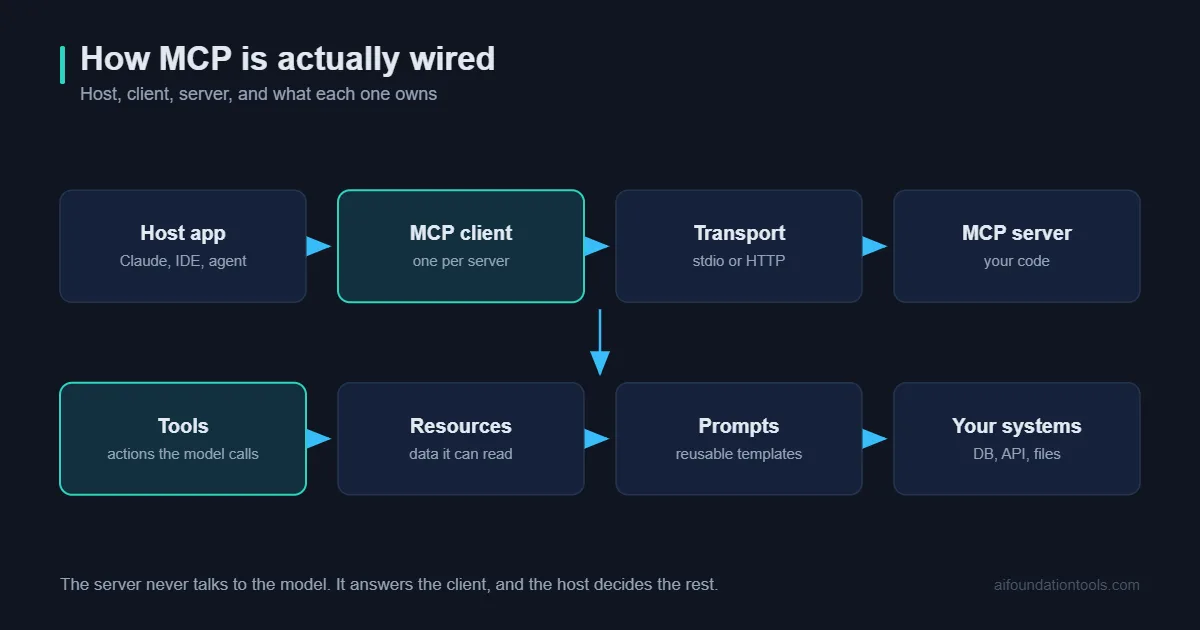
Three roles, and that is genuinely all.
The host. The AI application you interact with – a chat interface, an IDE, an agent runtime.
The client. The part of the host that speaks MCP, maintaining a connection to each server.
The server. A program exposing some capability. A filesystem server exposes files. A database server exposes queries. A Slack server exposes messages.
Servers run either locally on your machine, communicating over standard input and output, or remotely over HTTP. Local servers are the common case for personal use because your credentials never leave your machine. Remote servers are how companies offer MCP access to their platforms.
3. Servers Expose Three Things
The specification defines three primitives, and knowing the difference explains most of what you will see in documentation.
Tools. Actions the model can invoke – run a query, send a message, create a file. Model-controlled, meaning the model decides when to call them. This is the primitive people mean when they talk about MCP.
Resources. Data the model can read – a file, a record, an API response. Application-controlled, meaning the host decides what to expose rather than the model reaching for it.
Prompts. Reusable templates a user can invoke deliberately, often surfaced as slash commands.
Most servers you encounter are mostly tools. The distinction matters when you build one, because putting something behind the wrong primitive is a common design mistake – resources are for context you want available, tools are for actions with consequences.
4. Adoption Went Vertical
The numbers are unusual for an open standard this young.
By the end of 2025 there were more than 10,000 active public MCP servers. By May 2026, GitHub carried nearly 16,000 repositories tagged as MCP servers. The official SDKs now see close to half a billion downloads a month, with the TypeScript and Python SDKs each passing a billion downloads in total.
More telling than the raw numbers is who implemented it. Anthropic, OpenAI, Google, Microsoft, GitHub, Cursor, VS Code, Vercel and Cloudflare all support MCP. Competing labs agreeing on an integration standard is rare enough to be worth noticing – it usually means the alternative was worse for everyone.
One data point that captures the shift: the observability company Honeycomb reported that roughly a fifth of its monthly interactive queries now come from agents rather than humans.
5. The July 2026 Spec Made It Stateless
The 2026-07-28 specification was the most significant revision since remote servers launched, and the headline change is that MCP became a stateless request/response protocol.
Previously every connection began with an initialise handshake and carried a session identifier. That worked fine on a laptop and was miserable at scale – every request had to reach the same server instance, which meant sticky sessions and shared state.
Now each request is self-describing and can land on any instance behind an ordinary load balancer. Alongside that came several changes worth knowing:
- Header-based routing. Method and tool names travel in HTTP headers, so a gateway can route and rate-limit without parsing the request body.
- Cacheable listings. Tool catalogues carry cache hints, which keeps prompt caches stable across reconnects.
- Multi Round-Trip Requests. A tool that needs a confirmation mid-call can now ask for it without holding a stream open.
- Authorization hardening. Issuer validation is now required, and Dynamic Client Registration is formally deprecated in favour of client metadata documents.
- A real deprecation policy. Twelve months minimum before anything is removed, which is the sort of thing that makes a protocol safe to build a business on.
Roots, Sampling and Logging were deprecated in the same release, as was the legacy HTTP-plus-SSE transport. If you are following a tutorial written before mid-2026, check which spec version it targets.
6. You Are Probably Already Using It
MCP is largely invisible when it works. If your AI coding assistant reads your repository, if your chat app queries a database, if your IDE pulls issue context – there is a reasonable chance MCP is underneath.
The servers people actually run cluster into a few groups: filesystem and repository access, databases, issue trackers and project tools, communication platforms, browser automation, and search. Most companies now maintain an official server for their own platform, because the alternative is customers writing worse ones.
7. Tool Poisoning Is a Real Problem
This is the section most introductions skip, and it is the one that should shape how you use MCP.
A tool’s description is written by whoever wrote the server, and the model reads that description to decide when to call it. You, the user, generally do not read it. That gap is the vulnerability.
Tool poisoning is an indirect prompt injection where a server’s tool descriptions or responses carry hidden instructions aimed at the model rather than at you. A tool that appears to fetch the weather can also carry text instructing the model to read a credentials file and include the contents in its next request. The interface looks normal. The behaviour is not.
This is not theoretical. OWASP tracks MCP tool poisoning as a named attack, research benchmarks have found it widespread across public servers, and evaluations of MCP clients have found client-side defences generally inadequate – including popular developer tools showing susceptibility to cross-tool poisoning and unauthorised tool invocation.
The practical rules follow directly:
- Install servers the way you would install code that runs as you. Because that is what they are.
- Prefer first-party servers published by the company whose platform they access.
- Read the tool descriptions on anything you did not write. It takes a minute and it is the only place hidden instructions can live.
- Scope credentials narrowly. Read-only where possible, revocable always.
- Keep dangerous tools away from untrusted input. An agent that reads public web pages should not also hold the ability to send email.
None of this makes MCP unsafe to use. It makes it software with a supply chain, which deserves the same caution you would apply to any dependency.
8. It Is Not the Same as an Agent Framework
MCP and agent frameworks get conflated constantly. They operate at different layers.
| MCP | Agent framework | |
|---|---|---|
| What it is | A connection standard | A system that decides and acts |
| Answers | How do I reach this tool | Which tool should I use, and when |
| Owned by | An open standard body | Your platform or your code |
| Replaceable | Rarely – it is the substrate | Frequently |
An agent needs somewhere to get its tools from; MCP is increasingly that somewhere. Platforms like n8n let you build the decision-making layer while MCP supplies the connections – the patterns in our guide to n8n AI agents apply directly, and self-hosted agents like OpenClaw face the same supply-chain questions raised above.
Retrieval sits alongside rather than underneath. A knowledge base exposed through an MCP server is a perfectly reasonable design – if you are building one, our guides to retrieval-augmented generation and vector databases cover what goes behind it.
9. Writing One Is Easier Than Reading About It
The specification is long. Building a working server is not.
The official SDKs cover TypeScript, Python, Go and C#, with Rust in beta. A minimal server is a few dozen lines: declare a tool, describe what it does, implement the function, start the transport.
The genuinely hard part is not code, it is description. The tool description is how the model decides whether to call your tool, so vague wording produces a tool that never gets used or gets used at the wrong moment. Write descriptions the way you would document an API for a new colleague – what it does, when to use it, what it returns, what it will not do.
Most people who spend an afternoon writing their first server come away with a much clearer understanding of MCP than any amount of reading provides.
How to Actually Get Started
If you just want to use it: our roundup of the best MCP servers covers which to pick. Open the MCP settings in whichever AI tool you already use, add one official server for something you touch daily – your repository, your notes, your database – and work with it for a week. One server, not eight.
If you want to build: read the official documentation, pick the SDK matching your language, and wrap one internal API you already have. The exercise takes an afternoon and teaches you more than the specification will.
If you are evaluating it for an organisation: start with the security posture rather than the capabilities. Who may install servers, which ones are approved, how credentials are scoped, what gets logged. Those answers are harder to retrofit than they are to decide early.
Five Servers Worth Adding First
Rather than browsing a directory of thousands, these five cover most of what people actually gain from on day one.
Filesystem. Lets an assistant read and write files in a directory you nominate. Scope it to one project folder, not your home directory. The single most useful addition for anyone who works with documents or code.
Your repository host. Issues, pull requests, code search. Turns vague questions about a codebase into answers with references, and removes an enormous amount of tab-switching.
A database. Read-only credentials, always. Being able to ask questions of your own data in plain language is the capability people underestimate until they have it.
Your notes or documentation. Whichever tool holds your team knowledge. This is where the value compounds, because the assistant stops guessing about your specific context.
A browser or fetch server. Lets the assistant read pages properly rather than working from stale training data. Also the one most worth being careful with, since it is the clearest path for untrusted content to reach the model.
Add them one at a time, a few days apart. Adding eight at once means you cannot tell which one caused a behaviour change, and it inflates the tool catalogue enough that selection accuracy drops.
What It Does Not Solve
Worth being clear, because the enthusiasm around any successful standard tends to overreach.
It does not make a model smarter. Access to tools is not reasoning ability. A weak model given twenty tools is a weak model that now calls the wrong one confidently.
It does not decide anything. The protocol describes how to reach a capability, never when to use it. That judgement lives in the model and the surrounding system.
It does not guarantee quality. A badly written server with vague tool descriptions is badly written regardless of how well it conforms to the specification. Standard plumbing, poor fittings.
It does not fix data problems. Connecting an assistant to a database full of inconsistent records produces confident answers drawn from inconsistent records.
It does not remove the need for guardrails. If anything it raises the stakes, because the same standard that makes useful capabilities easy to add makes dangerous ones easy to add too.
Frequently Asked Questions
What does MCP stand for?
Model Context Protocol. It is an open standard for connecting AI applications to external tools and data sources.
Is MCP owned by one company?
It originated at Anthropic and is now maintained as an open standard under the Linux Foundation, with contributions from across the industry.
Do I need to code to use MCP?
No. Using existing servers is a configuration step in whichever AI tool you use. Writing your own server requires code.
Is it free?
The protocol is an open standard and free to implement. Individual servers may connect to services that charge, but MCP itself costs nothing.
What is the difference between a tool and a resource?
Tools are actions the model chooses to invoke. Resources are data the application makes available. Actions with consequences belong behind tools.
Is MCP secure?
The protocol has improved considerably, particularly around authorization. The larger risk is the ecosystem – servers are third-party code, and tool poisoning is a documented attack. Treat installation as a supply-chain decision.
Will it still matter next year?
The adoption curve, the breadth of vendor support and the move to neutral governance all suggest yes. Protocols that competitors agree on tend to persist, because the cost of abandoning them is shared.
Final Thoughts
MCP is not exciting, and that is the point. It solved a tedious integration problem well enough that companies who agree on very little agreed on this.
The practical consequence for anyone building with AI is that tools are becoming portable. The server you write today works with clients that do not exist yet. That is a considerably better position than maintaining bespoke integrations that break whenever anything upstream changes.
Add one server to a tool you use daily. Read its description before you trust it. That is the entire onboarding, and it will teach you more than this article did.
If you want to see where MCP tools actually get used, our guide to building an AI agent from scratch shows the loop that calls them.
For a current example of MCP arriving in non-developer software, see our coverage of DaVinci Resolve 21.1, which ships a native MCP server for Claude and Codex.
[…] weighing whether to adopt a commercial assistant at all versus wiring your own agent through the Model Context Protocol or a framework like LangGraph or CrewAI, that’s a legitimate third path — we cover building […]
[…] browser agent interacts with rendered web pages the way a human does — screenshots and clicks. An MCP-connected agent calls structured APIs and tools directly. They solve overlapping problems but through very […]
[…] than choosing one model, an MCP-connected system can route requests to different AI models based on what they need. A classification request […]
[…] is the open standard for giving AI assistants structured access to external tools, and our guide to MCP explained covers the mechanics. What is new here is the class of software adopting it. MCP servers for […]