

Table of Contents
- What a Vector Database Actually Does in a RAG Pipeline
- Do You Even Need a Dedicated Vector Database?
- How I Ranked These Tools
- The 7 Best Vector Databases for RAG in 2026
- Side-by-Side Comparison Table
- 5 Mistakes That Wreck RAG Quality
- How to Choose Yours in Under 10 Minutes
- Frequently Asked Questions
- Final Thoughts
Picking a vector database for RAG used to be a two-minute decision. There were three options, one of them was hosted, and you moved on. In 2026 there are more than fifteen credible choices, half of them claim sub-10ms latency on their homepage, and the wrong pick will quietly cost you either a fortune in hosting or six weeks of migration work you did not plan for.
I have watched teams burn a quarter on this. Not because they chose a bad vector database, but because they chose one for a scale they never reached. Somebody read a blog post about billion-scale retrieval, spun up a distributed cluster, and then spent the year serving 40,000 documents on infrastructure built for 400 million.

So this guide is deliberately opinionated. I am going to tell you what each vector database is genuinely good at, where it starts to hurt, and, more usefully, the point at which you should stop using it and move to something else.
What a Vector Database Actually Does in a RAG Pipeline
Quick refresher, because a surprising number of people ship retrieval-augmented generation without a clear mental model of this part.
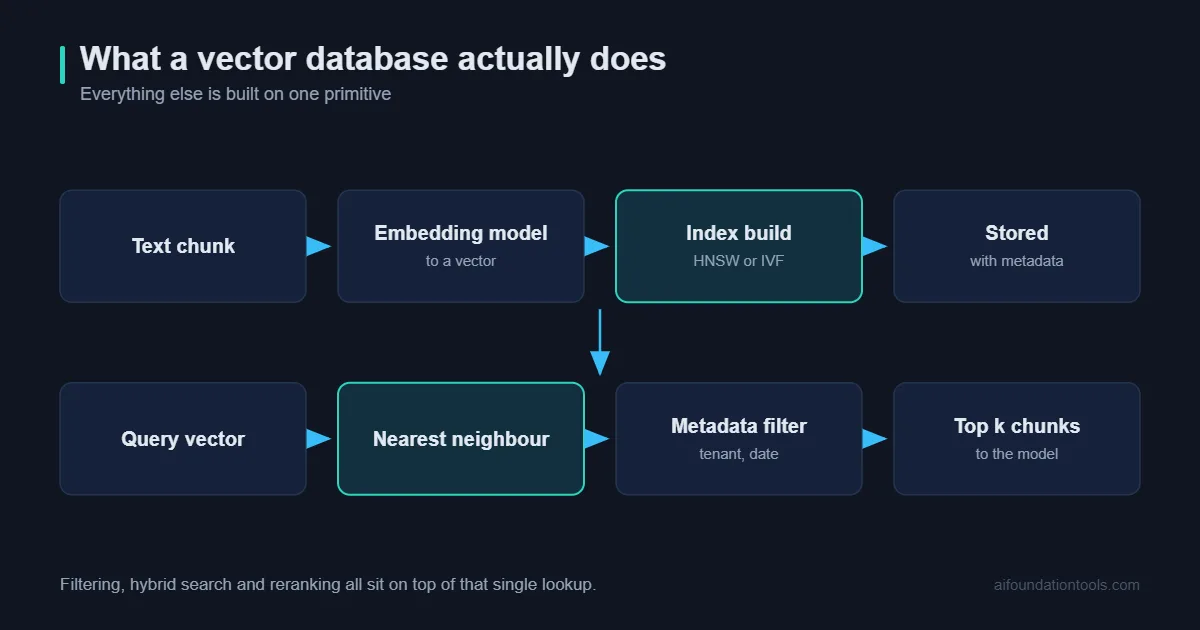
When you build a RAG system, you chop your documents into chunks, run each chunk through an embedding model, and get back a list of numbers — a vector. That vector is a coordinate in a space with somewhere between 384 and 3,072 dimensions. Chunks about similar things land near each other.
A vector database stores those coordinates and answers one question very fast: given this new vector, which stored vectors are closest to it? That is it. Everything else, filtering, hybrid search, reranking, sharding, is built on top of that single primitive.
The reason it needs to be a database and not a NumPy array is that brute-force comparison against ten million vectors is slow. So a vector database builds an approximate index, usually HNSW (a navigable graph) or IVF (a partitioned space), and trades a sliver of accuracy for a hundredfold speed gain.
If you want the fuller picture of how retrieval feeds into generation, our beginner guide to RAGFlow walks through the whole pipeline end to end.
Do You Even Need a Dedicated Vector Database?
Honest answer: quite possibly not.
If you are storing fewer than roughly 100,000 chunks and your traffic is measured in requests per minute rather than per second, a dedicated vector database is overkill. An in-memory index rebuilt on deploy, or a pgvector column on the Postgres instance you already run, will serve you fine and cost you nothing extra.
You should reach for a purpose-built vector database when at least two of these are true:
- You are past a few million vectors and index build times are becoming a scheduling problem.
- You need metadata filtering that stays fast — per-tenant, per-permission, per-date-range.
- You need p99 latency under about 50ms because retrieval sits inside a user-facing request.
- You are updating or deleting vectors constantly rather than rebuilding nightly.
- You want hybrid search, dense vectors plus keyword matching, without gluing two systems together.
That last point is the one people underestimate. Pure semantic search is bad at exact matches. Ask for an error code, a SKU, or a surname and a dense-only vector database will confidently return something thematically adjacent and completely wrong.
How I Ranked These Tools
Four things, weighted roughly in this order:
1. Filtered query performance. Anyone can be fast on an unfiltered top-k search. Real RAG almost always filters, by tenant, by document type, by recency. Some engines handle filters gracefully; others fall off a cliff.
2. Operational cost, in engineer-hours. A vector database that needs a dedicated platform engineer is expensive even when the licence is free.
3. Honest scaling ceiling. Where does it start to hurt, not where does the marketing page stop.
4. Escape hatches. Can you get your data out? Is the index format documented? Are you one pricing change away from a rewrite?
The 7 Best Vector Databases for RAG in 2026
1. Qdrant. The Best All-Round Vector Database for Filtered RAG
Qdrant is my default recommendation, and it has been for about eighteen months now.
The reason is filtering. Qdrant was designed from the start so that metadata filters are applied inside the graph traversal rather than bolted on before or after it. Practically, that means a query restricted to one customer out of 5,000 stays fast instead of degrading into a scan. Widely cited independent benchmarks on 10-million-vector datasets have put Qdrant at the front of the pack on p99 latency, typically in the low teens of milliseconds, with Weaviate and Milvus a few milliseconds behind.
Treat those numbers as directional rather than gospel, benchmark results shift with hardware, index parameters and dataset shape, and every vendor publishes a benchmark where they win. But the ordering has been fairly stable across independent tests.
Qdrant is written in Rust, runs as a single binary for development, and supports sparse vectors and multi-vector (ColBERT-style) retrieval natively, which matters if you want hybrid search without a second system.
Where it hurts: the distributed story is younger than Milvus. If you genuinely need multi-billion-vector sharding across a large cluster, look elsewhere. The Python client also lets you write inefficient batch patterns very easily.
Choose it if: you are between one million and a few hundred million vectors, filtering matters, and you want one moving part instead of six.
2. pgvector. The Best Vector Database If You Already Run Postgres
pgvector is a Postgres extension, not a separate vector database, and that is exactly why it belongs near the top of this list.
Your embeddings, your documents, your user permissions and your application data all live in the same place. You can join them. You can wrap a retrieval and a permission check in one transaction. You can back the whole thing up with the tooling you already have and the on-call rotation you already staff.
People dismiss it as the toy option. It is not. With HNSW indexing, pgvector handles single-digit millions of vectors comfortably on decent hardware. For the overwhelming majority of internal knowledge bases, support-ticket search and documentation assistants, it is genuinely the right answer.
Where it hurts: index build times get painful as you climb past a few million rows, and a heavy retrieval workload competes with your transactional traffic for the same resources. You will also do more tuning by hand than with a purpose-built vector database.
Choose it if: you are already on Postgres and under roughly five million vectors. Start here. Graduate later.
3. Weaviate. The Best Vector Database for Built-In Hybrid Search
Weaviate ships hybrid search as a first-class feature: dense vector similarity and BM25 keyword scoring, fused with a tunable alpha parameter, in a single query.
That is a bigger deal than it sounds. Getting hybrid retrieval right by hand means running two systems, normalising two incompatible score distributions, and maintaining fusion logic that nobody on the team fully remembers writing. Weaviate hands you a working version on day one.
It also has a modular vectoriser system, so the vector database can call your embedding provider directly on insert. Fewer moving parts in your ingestion pipeline, at the cost of some flexibility.
Where it hurts: the resource footprint is heavier than Qdrant for equivalent workloads, and the GraphQL-flavoured query API is a genuine acquired taste.
Choose it if: your corpus is full of product names, part numbers, legal citations or anything else where exact keyword matching still matters.
4. Milvus. The Best Vector Database for Billion-Scale Workloads
Milvus is the heavy machinery. Compute and storage are separated, indexing and querying scale independently, and it will genuinely handle billions of vectors without complaint.
It also supports a wider range of index types than almost anything else here, HNSW, IVF variants, DiskANN, scalar and product quantisation, which means you can trade recall against memory very deliberately when your dataset stops fitting in RAM.
Where it hurts: the architecture is genuinely distributed, which means etcd, object storage, a message queue and several coordinator roles. That is a real platform engineering commitment. Running Milvus properly is somebody’s job.
Choose it if: you are past a few hundred million vectors and you have the engineering capacity to operate a distributed system. If you do not, use the managed version rather than self-hosting.
5. Pinecone. The Best Managed Vector Database for Small Teams
Pinecone is the option you pick when nobody on the team wants to think about infrastructure again.
There is no cluster to size, no index type to choose, no HNSW parameter to tune at 2am. You write vectors, you query vectors, it works. For a small product team shipping a feature rather than building a platform, that is worth real money.
Where it hurts: you are fully committed to somebody else’s pricing model and roadmap. Costs at scale can surprise you, and the abstraction that makes it pleasant also removes the knobs you need when a specific query pattern turns out to be slow. Serverless billing in particular rewards careful query design and punishes chatty prototypes.
Choose it if: engineering time is your scarcest resource and predictable operations matter more than per-query cost optimisation.
6. Chroma. The Best Vector Database for Prototyping
Chroma is three lines of Python to a working retrieval system, and that is exactly the point.
Almost every RAG project I have seen starts in Chroma. It runs in-process, persists to disk, requires no configuration, and integrates cleanly with LangChain and LlamaIndex. For notebooks, demos and the first eight weeks of a project, nothing beats it.
Where it hurts: it is not built for high-concurrency production serving at scale. Push it hard with a real traffic pattern and you will feel it.
Choose it if: you are validating whether RAG solves your problem at all. Plan the migration for later, and design your retrieval layer behind an interface so that migration is a day, not a month.
7. Elasticsearch and OpenSearch. Best If You Already Run a Search Cluster
If your company already operates OpenSearch or Elasticsearch for logs and site search, adding dense vector fields to an existing index is often the pragmatic move.
You inherit mature operational tooling, battle-tested cluster management, permissions, snapshots and an on-call team that already knows the system. Hybrid search comes essentially free because the keyword half was always there.
Where it hurts: pure vector performance trails the specialists, memory usage is high, and JVM tuning is a skill with a real learning curve.
Choose it if: the cluster already exists and the alternative is introducing a brand-new system into your stack.
Side-by-Side Comparison Table
| Tool | Best for | Comfortable scale | Ops burden | Hybrid search |
|---|---|---|---|---|
| Qdrant | Filtered RAG, general default | 1M – 300M | Low | Native |
| pgvector | Teams already on Postgres | Up to ~5M | Very low | Via SQL, manual |
| Weaviate | Keyword-heavy corpora | 1M – 100M | Medium | Best in class |
| Milvus | Billion-scale retrieval | 100M – billions | High | Supported |
| Pinecone | Zero-ops product teams | Any (managed) | None | Supported |
| Chroma | Prototypes and notebooks | Under ~1M | None | Basic |
| OpenSearch | Existing search clusters | 1M – 100M | Medium-high | Native |
5 Mistakes That Wreck RAG Quality. And Are Not the Database’s Fault
Before you blame retrieval quality on your vector database, rule these out. In my experience four out of five “the vector database is bad” complaints turn out to be one of these.
1. Your chunks are the wrong size. See our breakdown of chunking strategies. Chunking blindly at 512 tokens splits tables, separates headings from their content, and cuts sentences in half. Chunk on document structure first, then on size.
2. You skipped reranking. Retrieve 50 candidates with the vector database, then rerank to the best 5 with a cross-encoder. This is the single highest-return change most RAG systems can make, and it costs a few dozen milliseconds.
3. You are using a weak embedding model. The retrieval ceiling is set by your embeddings, not your index. A better model beats a better vector database almost every time.
4. You have no evaluation set. Fifty real questions with known correct sources. Without it you are tuning by vibes, and you will not notice the day a change makes things worse.
5. You ignored metadata. Store the source, section, date and permissions with every chunk. It powers filtering, it powers citations, and it is nearly impossible to backfill later.
If you would rather not assemble all of this yourself, a managed engine handles most of it out of the box, our write-up on RAGFlow in 2026 covers that route, and you can wire the results into an automation layer using n8n.
How to Choose Yours in Under 10 Minutes
Work down this list and stop at the first match.
- Still prototyping? Chroma. Move on with your life.
- Already running Postgres, under ~5M vectors? pgvector. Do not overthink it.
- Already running Elasticsearch or OpenSearch? Add vector fields there first.
- Nobody wants to run infrastructure? Pinecone, or a managed Qdrant or Weaviate cluster.
- Lots of exact-match terms in your corpus? Weaviate.
- Past a few hundred million vectors with a platform team? Milvus.
- Everything else, which is most projects? Qdrant.
If you plan to expose your retrieval layer to agents, it will most likely travel over MCP. One more piece of advice worth more than the ranking: put your retrieval behind a thin interface with four methods, upsert, query, delete, count. Swapping the vector database underneath then becomes an afternoon’s work rather than a quarter-long migration. Teams that do this change engines twice without drama. Teams that do not end up defending a bad decision for two years because switching is too expensive.
Frequently Asked Questions
Is a vector database the same as a graph database?
No. A graph database stores explicit relationships you define. A vector database stores numerical coordinates and finds neighbours by mathematical distance. Some systems now do both, but the primitives are different.
Can I run RAG without any vector database at all?
Yes, under maybe 20,000 chunks. Load embeddings into memory and use brute-force cosine similarity with NumPy or FAISS. It is fast, free, and completely adequate at that size.
How much does the choice affect answer quality?
Less than people expect. Assuming sane index settings, your embedding model, chunking strategy and reranker have far more influence on output quality than which engine stores the vectors.
Which one is cheapest?
pgvector, because it runs on infrastructure you already pay for. Among the dedicated options, self-hosted Qdrant tends to give the best performance per unit of hardware. Managed services cost more in money and less in attention, pick which currency you would rather spend.
Do I need to re-embed everything if I switch?
Only if you also change embedding models. The vectors themselves are just arrays of floats and port cleanly between systems. Keep your raw chunks and their embeddings in durable storage so a rebuild is always possible.
Final Thoughts
The vector database market has matured to the point where there is no longer a wrong answer among the serious options, only answers that are wrong for you. Qdrant, Weaviate, Milvus, pgvector and Pinecone are all production-grade. Any of them will serve a well-built RAG system competently.
What separates good systems from bad ones is almost never the engine. It is chunking, embeddings, reranking and evaluation. Pick the simplest option that clears your current requirements, keep the interface thin, and spend the time you saved on retrieval quality instead.
Start with pgvector or Chroma. Move to Qdrant when you feel the pain. Consider Milvus when a Qdrant cluster stops being enough, and be quietly pleased if you never get there, because most projects never do.
[…] you’re still setting up the retrieval side, our guides to RAG chunking strategies and vector databases for RAG cover the layers these metrics are […]