
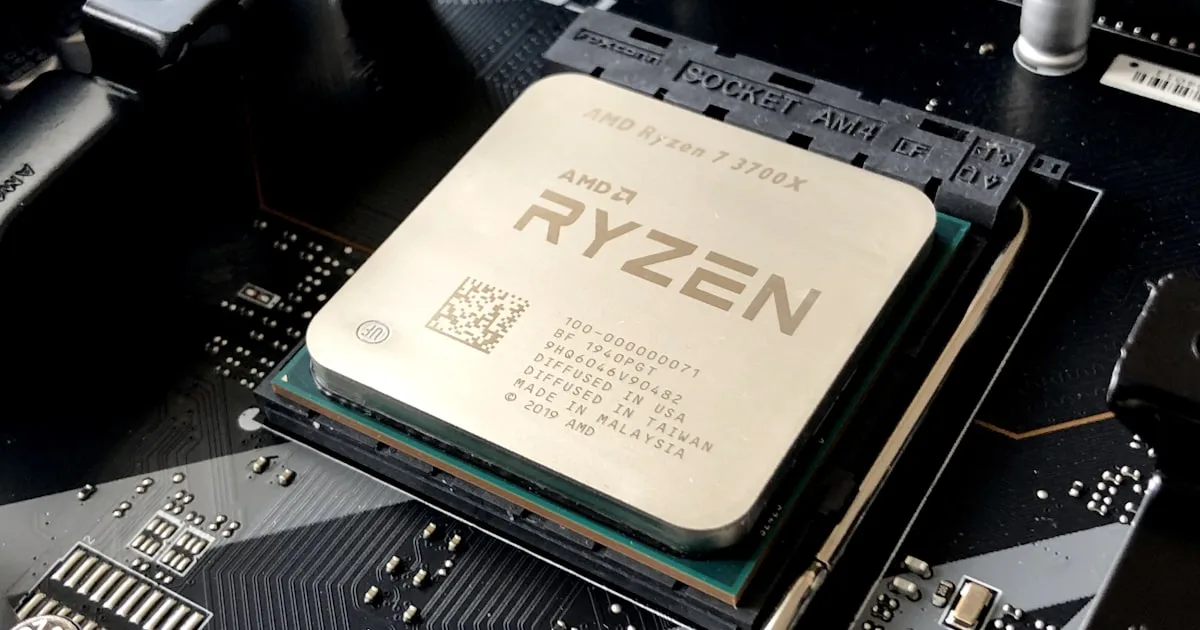

This review is built from published specifications, current retail pricing and third-party testing rather than hands-on use. Figures are attributed to their sources, and pricing in this category has moved sharply through 2026 — verify before you buy.
The Framework Desktop was announced at $1,999 for the 128GB configuration, and that number no longer exists. As of August 2026 it lists at $3,449, and every Ryzen AI Max+ 395 build is sold as a pre-order rather than in-stock. That is not a Framework problem. It is a DDR5 problem, and it has reshaped this entire product category in eighteen months.
What hasn’t changed is the reason people wanted the Framework Desktop: roughly 96GB of usable GPU memory in a 4.5-litre box drawing well under 150W. No consumer discrete card comes close on capacity. Whether that makes the Framework Desktop the right purchase depends almost entirely on one question that has nothing to do with the silicon.
This Framework Desktop review covers what the machine is, what it realistically achieves on local models, and how it compares to the alternatives that share its chip.
In this guide:
- What the Framework Desktop Actually Is
- The Strix Halo Spec That Matters
- Real Performance Expectations
- The ROCm Question
- Framework Desktop vs the Alternatives
- Who Should Buy What
- Frequently Asked Questions About the Framework Desktop
- Verdict
- Sources and Further Reading
What the Framework Desktop Actually Is
The Framework Desktop is a 4.5-litre mini-ITX system built around AMD’s Ryzen AI Max+ 395, the chip codenamed Strix Halo. Framework’s pitch is openness: a standard mini-ITX board, documented internals, a PCIe slot, and Linux treated as a first-class target rather than an afterthought.
That last point separates it from most of the field. The same chip appears in the GMKtec EVO-X2, the Beelink GTR9 Pro, MINIX and Bosgame boxes, and AMD’s own Ryzen AI Halo Developer Platform. The silicon is identical. What differs is the chassis, the networking, the cooling, and how much the vendor cares whether Linux works properly on day one.
Framework also sells the Framework Desktop mainboard on its own, which is genuinely unusual in this category and matters if you want to put Strix Halo into your own case.
The Strix Halo Spec That Matters
The Ryzen AI Max+ 395 pairs 16 Zen 5 cores with a 40-compute-unit Radeon 8060S integrated GPU and an XDNA 2 NPU rated at 50 TOPS. All three share a single 128GB LPDDR5X-8000 pool across a 256-bit bus.
Two numbers define what the Framework Desktop can and can’t do.
Capacity: about 96GB addressable as GPU memory on Linux. That is triple what an RTX 5090 offers and roughly six times an RTX 5070 Ti. Models that physically cannot load on any single consumer discrete card fit here comfortably.
Bandwidth: roughly 256 GB/s. An RTX 5090 is in the region of 1,792 GB/s. That gap is the entire story of this platform’s performance profile, and no amount of software tuning closes it.
Strix Halo is a capacity-first machine, not a bandwidth-first one. Understanding that distinction before you buy prevents nearly every disappointment people report with it.
Real Performance Expectations
Published testing across ServeTheHome, CraftRigs and community llama.cpp runs converges on a consistent picture, and the AMD Ryzen AI Halo Developer Platform review (same chip, different chassis) gives the clearest published figures:
| Model class | Reported throughput |
|---|---|
| Sub-10B dense | Roughly 40–80 tokens/sec |
| 27–35B MoE | Usable double digits |
| Qwen3-30B | Around 100 tokens/sec reported |
| Dense 70B | Single digits |
That table is the honest Framework Desktop summary. A 70B dense model fits in memory, which is the headline. It does not run fast. If your workload is a 70B dense model at conversational speed, this is not the machine, and no Strix Halo box is.
Where it genuinely shines is the middle: 27–35B mixture-of-experts models that need more memory than a 5090 offers but don’t saturate the bandwidth ceiling. That band is currently the sweet spot for the entire platform.
For context on how memory capacity drives model choice, our guide to how much VRAM you need for local AI covers the sizing arithmetic in detail.
The ROCm Question
This is the part of any Framework Desktop review that matters more than any benchmark, and it’s where I’d push back on most coverage of this machine.
The silicon is good. AMD’s software stack is the variable. ROCm support for gfx1151 (the Strix Halo GPU target) has improved substantially, and Ollama, LM Studio and llama.cpp all work — but “works” and “works as smoothly as CUDA” remain different claims in 2026.
Practical implications, based on reported community experience:
- Ollama and LM Studio are the low-friction path and handle most single-user local inference well.
- llama.cpp with Vulkan or ROCm backends gives more control and is where the community has done most of its tuning work.
- vLLM and the wider production serving ecosystem are CUDA-first. Support exists; maturity lags.
- Anything niche (a new quantisation format, a research repo, an exotic fine-tuning script) is likelier to assume CUDA and need adaptation.
If you are comfortable reading GitHub issues and occasionally compiling something yourself, none of this is a barrier. If you want hardware that disappears into the background, that friction is a real cost and worth pricing into the decision.
Framework Desktop vs the Alternatives
The Framework Desktop and the two Strix Halo boxes below run the same chip at similar performance. Pick on everything else.
| Framework Desktop | GMKtec EVO-X2 | Beelink GTR9 Pro | |
|---|---|---|---|
| 128GB price (Aug 2026) | $3,449 | $3,649.99 (2TB SSD) | $4,349 |
| Networking | 5GbE | Single 2.5GbE | Dual 10GbE |
| Expansion | PCIe slot, standard mini-ITX | Dual M.2, two USB4 | Dual USB4 |
| Cooling | Noctua fan option | Audible under load | Vapor chamber, quietest |
| Linux | First-class target | Works | Intel E610 NIC needs driver workaround |
| Best for | Openness, Linux, tinkering | Price per usable GB | Model-serving node |
Against the non-AMD field, two Framework Desktop comparisons matter. NVIDIA’s DGX Spark rose to $4,699 in the 2026 memory crunch, so Framework undercuts it meaningfully while running native Windows or Linux rather than a locked-down Linux appliance. Apple’s Mac Studio with M5 Ultra starts at $5,499 for 96GB and delivers 1.2TB/s of bandwidth (nearly five times Strix Halo) but at more than 50% higher entry cost.
Power, Noise and Running Costs
One argument for the Framework Desktop gets less attention than it deserves, and it is the one that ages best.
The Ryzen AI Max+ 395 has a 55W default TDP, with the Framework Desktop typically drawing around 65W and boosting to roughly 120W. A comparable multi-GPU NVIDIA tower running the same class of model can pull five to ten times that under load. Over a machine that runs inference for several hours a day, that difference shows up on an electricity bill and in how comfortable the room is to sit in.
It also changes where the machine can live. A 4.5-litre box drawing under 150W fits on a desk, in a media cabinet, or on a shelf without a dedicated cooling plan. A dual-GPU tower does not, as our dual-GPU build guide sets out in detail.
The Framework Desktop’s Noctua fan option is worth taking if it is available in your configuration. Third-party coverage consistently rates cooling and noise as a genuine differentiator between the Strix Halo boxes, and it is the kind of thing that determines whether you keep a machine on your desk or exile it to a cupboard.
Who Should Buy What
| If you are | Start with | Why | Link |
|---|---|---|---|
| A Linux tinkerer wanting an open platform | Framework Desktop 128GB | PCIe slot, documented internals, Linux-first vendor | Check price |
| Cost-focused, want maximum GB per dollar | GMKtec EVO-X2 | Cheapest route to 128GB, accept fan noise and 2.5GbE | Check price |
| Building an always-on serving node | Beelink GTR9 Pro | Dual 10GbE and vapor-chamber cooling justify the premium | Check price |
| Running dense 70B at real speed | None of these | Bandwidth-bound; look at Mac Studio M5 Ultra or multi-GPU | N/A |
| On a tighter budget, 32B models are fine | RTX 5080 build | Far higher bandwidth, far less capacity | N/A |
What You Give Up Versus a Discrete GPU
Worth stating plainly, because the capacity headline can obscure it.
Training and fine-tuning. Most fine-tuning tooling assumes CUDA. LoRA and QLoRA workflows on AMD hardware are possible but meaningfully less well-trodden. If fine-tuning is central to your work rather than occasional, the Framework Desktop will frustrate you.
Image and video generation. Diffusion models are more compute-bound than LLM inference, which plays to the discrete GPU’s strengths. Stable Diffusion and similar workloads run, but an RTX 5080 will be considerably faster despite having a quarter of the memory.
Anything CUDA-only. A meaningful share of research code, some quantisation tooling, and much of the production serving stack assume NVIDIA. You can usually find an alternative path; you will sometimes spend an evening finding it.
Peak single-model speed. For any model that fits comfortably in 24GB or 32GB, a discrete card wins clearly on bandwidth. The Framework Desktop’s advantage only appears once you exceed what a consumer card can hold.
None of these are dealbreakers for the intended audience. All of them are worth knowing before you spend $3,449.
Frequently Asked Questions About the Framework Desktop
Can the Framework Desktop actually run a 70B model?
Yes, in memory. That’s the point of 96GB addressable GPU memory. But dense 70B throughput falls to single-digit tokens per second because of the 256 GB/s bandwidth ceiling. It works for batch jobs and patient use, not interactive chat.
Is the memory upgradeable?
No. The LPDDR5X is soldered as part of the Strix Halo package. Whatever configuration you buy is permanent, which makes the 64GB versus 128GB decision more consequential than usual.
Does it run Windows?
Yes. Unlike the DGX Spark’s Linux-only appliance model, this is standard x86, so Windows 11 and Linux both work, including dual-boot. That’s a genuine advantage if the machine doubles as a desktop.
How does the NPU factor in?
The XDNA 2 NPU is rated at 50 TOPS but sees limited use in mainstream LLM inference tooling today. Most local-AI workloads run on the Radeon 8060S iGPU, not the NPU. Treat NPU capability as future potential, not current value.
Why did the price nearly double?
The DDR5 and LPDDR5X shortage running through 2026. The same pressure pushed the DGX Spark to $4,699 and NVIDIA’s RTX PRO 6000 from $8,565 to well over $13,000. Framework’s hardware didn’t change; memory cost did.
Should I wait for the next generation?
AMD has signalled a Strix Halo successor, often referred to as Medusa Halo, but nothing shippable had been announced as of mid-2026. If you need the capability now, waiting has an indefinite horizon and memory prices may not improve.
Buying and Availability Notes
Two practical points that affect whether you can actually get one.
Every Ryzen AI Max+ 395 Framework Desktop configuration was selling as a pre-order rather than in-stock as of August 2026, with lead times varying. That is consistent across the category rather than specific to Framework, and it reflects LPDDR5X allocation rather than assembly capacity.
Pricing has also moved in one direction. The 128GB configuration went from $1,999 at announcement to $3,449, while the 64GB build sat at $1,959. If the 64GB tier covers your models, the saving is now large enough to change the decision for many buyers, and 64GB still exceeds what any consumer discrete card offers.
Verdict
The Framework Desktop is the right Strix Halo box for people who want an open, Linux-friendly platform and are willing to trade some price and some polish for it. The PCIe slot, the standard mini-ITX board and the separately purchasable mainboard genuinely matter if you plan to tinker, and Framework’s Linux support is the most credible in this group.
The honest caveat is that this is a capacity machine wearing performance marketing. Ninety-six gigabytes of GPU-addressable memory sounds transformative until you meet the 256 GB/s bandwidth wall on a dense 70B model. Buy it because you need large models resident in memory on a small, quiet, power-efficient box. Do not buy it expecting discrete-GPU speed, and do not buy it if ROCm troubleshooting sounds like a bad evening.
Concrete next step: before ordering, pick the two or three specific models you actually intend to run and search for community llama.cpp throughput figures for those exact models on gfx1151. That fifteen-minute check will tell you more about whether this machine fits your work than any review, including this one.
Sources and Further Reading
- ComputingForGeeks Ryzen AI Max+ 395 mini PC comparison, side-by-side pricing and specs for the three main Strix Halo boxes, with cited tokens/sec figures
- ServeTheHome Framework Desktop review, hands-on testing from a reviewer running multiple Strix Halo systems
- Framework official product page, current configurations, pricing and stock status
- Liliputing on Strix Halo mini PC pricing, tracks how memory shortages moved prices across vendors
- AMD Ryzen AI Halo Developer Platform review, benchmark figures on the same chip in AMD’s own chassis
For related coverage on this site, see our best GPUs for local AI ranking, the NVIDIA DGX Spark review for the closest competitor, how much VRAM you need for sizing guidance, and our best local LLMs guide for choosing models that suit this hardware’s capacity-first profile.


