

Table of Contents
- The Short Verdict
- Pods and Serverless Are Two Different Products
- RunPod Pricing in 2026
- The Storage Bill Nobody Budgets For
- Cold Starts, the Real Serverless Tax
- Community Cloud Versus Secure Cloud
- What This RunPod Review Rates Highly
- Where RunPod Frustrates People
- The Duty Cycle Calculation
- Who Should Use It
- Getting Started Without Wasting Money
- RunPod Against the Alternatives
- How a RunPod Serverless Deployment Is Structured
- 6 Mistakes That Inflate a RunPod Bill
- Frequently Asked Questions
- Verdict

Disclosure on method: this RunPod review is built from published pricing and documentation rather than from a sustained deployment of our own. Figures are labelled with their source, and we have not measured cold start times on RunPod’s fleet ourselves.
RunPod solves a specific problem well: you have a model, you need a GPU for the minutes it is actually working, and you do not want to pay for the hours it is not. If that is your problem, this is one of the better answers available. If it is not your problem, RunPod is an expensive way to rent a GPU.
Most reviews get this wrong by comparing the hourly rate to a persistent instance and declaring RunPod costly. That comparison is meaningless without knowing how often your GPU is busy, which is the number this review keeps returning to.
The Short Verdict
Use RunPod if your inference traffic is spiky, you want to deploy a model without managing infrastructure, or you need a GPU for an afternoon of experimentation and then nothing for a week.
Look elsewhere if your GPU runs most of the day, you need strict data residency guarantees, or your workload cannot tolerate a cold start.
Pods and Serverless Are Two Different Products
This confuses more people than anything else in RunPod, and getting it wrong is expensive.
Pods are persistent GPU rentals. You start one, it runs, you pay for every hour it exists whether or not you use it, and it stops when you stop it. This is a normal cloud GPU instance with a friendlier interface.
Serverless scales to zero. You deploy a container, RunPod holds it ready, and you are billed per second of active execution only. Idle costs nothing. Traffic spikes are absorbed by spinning up more workers automatically.
Serverless rates per hour are higher than Pod rates for the same card, and that is not a markup so much as a different unit. You are buying hours of work rather than hours of existence. Any RunPod review that compares the two headline numbers directly is comparing a taxi fare to a car payment.
RunPod Pricing in 2026
Published rates as of mid-2026, subject to change.
| GPU | VRAM | Serverless, per active hour | Typical use |
|---|---|---|---|
| RTX 4090 | 24GB | ~$1.10 | 7B to 13B inference, image generation |
| A100 | 80GB | ~$2.72 | Larger models, fine-tuning |
| H100 | 80GB | ~$4.55 | 70B inference, serious training |
| H200 | 141GB | ~$5.93 | Long context, larger models unsplit |
| B300 | 280GB | ~$9.98 | Blackwell Ultra, frontier-scale work |
Serverless GPU worker pricing spans roughly $0.58 to $9.98 per hour depending on the card, billed per second of active execution. That per-second granularity is the product. A request that takes 800 milliseconds costs 800 milliseconds.
The range is worth noticing. RunPod carries cards from consumer 4090s up to B300s, which is a wider spread than most providers offer and makes it unusually good for matching hardware to a specific model size rather than over-provisioning.
The Storage Bill Nobody Budgets For
Network Storage Standard is $0.07 per GB-month under 1TB and $0.05 per GB-month above it. High-Performance storage is $0.14 per GB-month.
That reads as trivial and is not. A 70B model in 16-bit is around 140GB. Keep that on high-performance storage and you are paying roughly $20 a month before a single inference runs. Add checkpoints, datasets and a couple of model variants and storage becomes a real line item that persists whether or not you use any GPU at all.
This is the most common surprise in a first RunPod bill, and the fix is boring: delete model weights you are not serving, and keep only the active model on high-performance storage.
Cold Starts, the Real Serverless Tax
Scale to zero has a cost, and it is not measured in dollars.
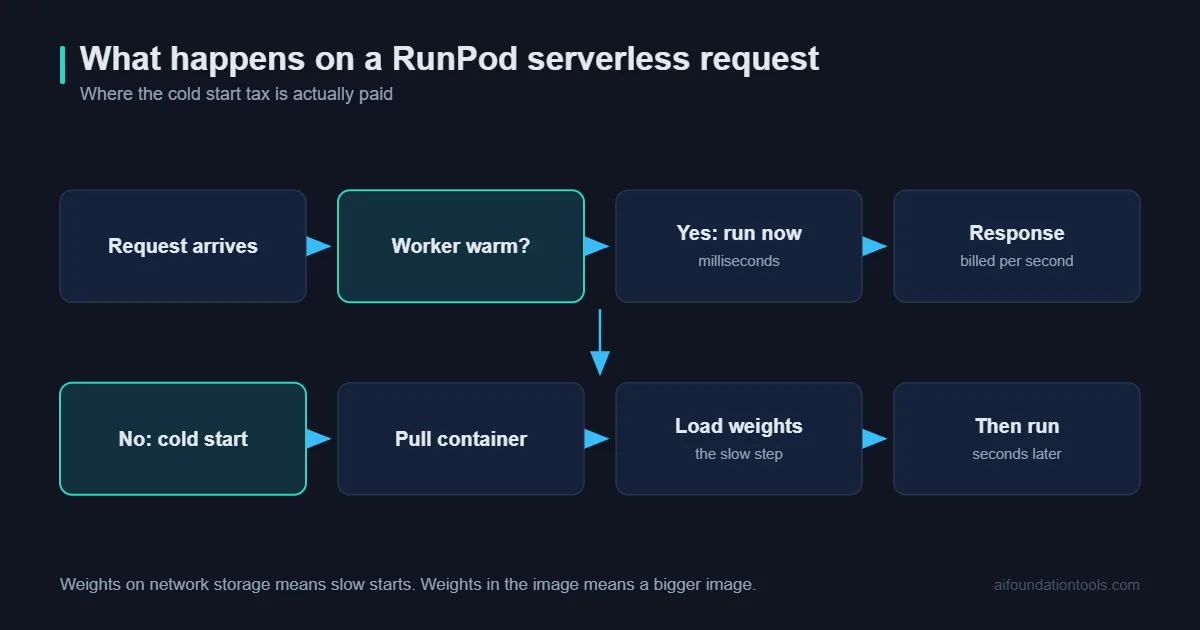
When no worker is warm, a request has to wait for a container to start and a model to load into VRAM. For a small model that might be seconds. For a 70B model loading 40GB of weights from network storage, it is considerably longer.
RunPod offers active workers that stay warm, which eliminates the cold start and reintroduces the idle cost you came here to avoid. That tension is inherent to serverless GPU work and not a flaw specific to RunPod. The practical answer most teams land on: keep one worker warm during business hours, scale to zero overnight.
If your product has a user waiting on the response, measure cold start on your actual model before committing. This is the single most likely reason a serverless deployment gets abandoned.
Community Cloud Versus Secure Cloud
RunPod runs two tiers and the distinction matters for anything sensitive.
Community Cloud is capacity from third-party hosts. Cheaper, and the hardware sits in someone else’s data centre under someone else’s operational standards.
Secure Cloud is RunPod’s own vetted data centre capacity. More expensive, with the controls you would expect.
For public models and non-sensitive experiments, Community Cloud is good value. For anything under a client agreement or handling personal data, this RunPod review would point firmly at Secure Cloud, or at a provider with clearer residency guarantees such as an OVH GPU server if EU data residency is the requirement.
What This RunPod Review Rates Highly
Per-second billing that is real. Not rounded to the minute, not with a minimum charge that undoes the point. For workloads with short inference times this is the whole value proposition and it works.
Genuine scale to zero. An idle serverless endpoint costs nothing but storage. For a side project or an early product with unpredictable traffic, that changes what is affordable.
Hardware range. From a 24GB 4090 at around a dollar an hour to a 280GB B300. Very few providers let you match the card to the model this precisely.
Deployment is genuinely fast. Container in, endpoint out. If you have a working Docker image, you are serving in minutes rather than in an afternoon of infrastructure work.
No sales process. Sign up, add a card, deploy. For individuals and small teams this removes a category of friction that the enterprise clouds still impose.
Where RunPod Frustrates People
Cold starts on large models. Covered above, and the most common reason a serverless plan gets rewritten.
Availability is not guaranteed. Popular GPU types run out, particularly on Community Cloud. If your business depends on an H100 being available at 9am, this model of provisioning carries risk that a reserved instance does not.
Storage costs compound quietly. The GPU bill scales with use. The storage bill does not, and it arrives every month regardless.
Data residency is weak. If your compliance position requires knowing which jurisdiction processes your data, Community Cloud in particular will not satisfy it.
Debugging is harder than on a Pod. A serverless worker that fails intermittently is a genuinely awkward thing to diagnose. Many teams develop on a Pod and deploy to Serverless for exactly this reason, which is the right pattern.
The Duty Cycle Calculation
The number that decides everything, and one most teams have never measured.
Take an H100. Serverless is roughly $4.55 per active hour. A persistent instance elsewhere is roughly EUR 2.80 per hour of existence. The crossover is where your GPU is busy about 60 percent of the time.
Above 60 percent utilisation, a persistent instance is cheaper and you should rent one.
Below 20 percent, serverless is dramatically cheaper and the decision is not close.
Between the two, cold start tolerance decides it rather than cost.
Most inference workloads that feel busy are running at under 15 percent GPU utilisation. Log a week of actual busy time before you argue with that. It is the cheapest piece of engineering work available to you and it routinely changes the answer.
Who Should Use It
A good fit: Products with spiky or unpredictable inference traffic. Developers experimenting across many model sizes. Anyone serving a model to real users at low or uneven volume. Teams without infrastructure staff.
A poor fit: Continuous training runs. Latency-critical products that cannot absorb a cold start. Anything with strict data residency obligations. Workloads at consistently high utilisation, where a persistent instance simply costs less.
Getting Started Without Wasting Money
Develop on a Pod, deploy to Serverless. Iterating against a live serverless endpoint is slow and awkward. Get the container working on a persistent Pod, then publish it.
Pick the smallest card that fits. A 13B model at 4-bit does not need an H100. The 4090 at around $1.10 an hour serves a great many production workloads that people run on far more expensive hardware.
Bake weights into the image where you can. Loading from network storage on every cold start is slow and adds storage cost. For smaller models, a larger container image is often the better trade.
Set spending limits before your first deploy. Not after.
Measure cold start on your real model. Not on a demo model. The number changes by an order of magnitude with model size.
| If you are | Start with | Why | |
|---|---|---|---|
| Serving 7B to 13B | RTX 4090 Serverless | ~$1.10/hr active, 24GB is enough quantised | Check price |
| Serving 70B | H100 Serverless | 80GB fits it quantised, ~$4.55/hr active | Check price |
| Long context work | H200 | 141GB, avoids splitting the model | Check price |
| Developing and testing | Any Pod | Persistent, far easier to debug | Check price |
RunPod Against the Alternatives
No provider wins on every axis. Here is where RunPod sits.
| Provider | Billing model | Scales to zero | Best for |
|---|---|---|---|
| RunPod | Per second, active only | Yes | Spiky inference, experimentation |
| OVHcloud | Per hour, instance exists | No | EU residency, sustained workloads |
| Hyperscalers | Per hour, plus commitments | Partly | Existing enterprise contracts |
| Own hardware | Capital, then electricity | N/A | Daily use, privacy, no metering |
The pattern worth noticing is that these are not really competitors. A sensible setup often uses two of them: a workstation for daily development, RunPod for serving, and a persistent instance rented only for the occasional training run. Teams that pick one and force everything through it pay for the mismatch somewhere.
How a RunPod Serverless Deployment Is Structured
Worth understanding before you build, because the structure constrains what you can change later.
You supply a container image with a handler function. RunPod calls that handler with the request payload and returns whatever it gives back. Everything else, the queueing, the scaling, the routing, is theirs.
Three decisions inside that structure carry most of the consequences.
Where the model weights live. Baked into the image means a bigger image and faster cold starts. On network storage means a smaller image, a monthly storage bill, and slower cold starts. There is no third option and no right answer independent of model size.
Whether you keep a worker warm. This is the cold start decision expressed in money, and it should be a business decision about acceptable latency rather than an engineering default.
Your maximum worker count. The ceiling on both your throughput and your bill. Set it deliberately. A retry storm against an unbounded autoscaler is the failure mode that produces the invoice people write blog posts about.
None of this is complicated, but all three are difficult to change once you have traffic. Decide them before you deploy rather than after.
6 Mistakes That Inflate a RunPod Bill
1. Leaving a Pod running. Pods bill for existence. An H100 Pod forgotten over a weekend is a real number.
2. Keeping unused models on high-performance storage. At $0.14 per GB-month, three unused 70B checkpoints cost more than most people’s compute.
3. Over-provisioning the card. Renting an H100 to serve a 7B model is common and roughly four times the necessary rate.
4. Too many warm workers. Every active worker reintroduces idle cost. One is usually enough.
5. Not setting a max worker count. Autoscaling is a feature until a traffic spike or a retry loop scales you somewhere expensive.
6. Choosing serverless for a constant workload. The most expensive mistake in this RunPod review, and the easiest to avoid by measuring utilisation first.
Frequently Asked Questions About RunPod
Is RunPod cheaper than AWS? For intermittent inference, substantially. For continuous training, the comparison narrows and often reverses.
How long are cold starts? Depends almost entirely on model size and where weights load from. Seconds for small models, considerably longer for large ones. Measure yours.
Can I run training on it? Yes, on Pods. Serverless suits inference. Long training runs on a persistent instance elsewhere are often cheaper.
Is my data private? Secure Cloud gives you RunPod’s own vetted data centres. Community Cloud is third-party hosts. Choose accordingly, and do not put regulated data on Community Cloud.
What happens if a GPU is unavailable? Your request queues or fails depending on configuration. For anything with an availability commitment, that risk needs pricing in.
Does it work with Ollama or vLLM? Yes. Anything you can containerise runs. vLLM is the common choice for serving, and RunPod publishes templates for it.
Verdict
RunPod is the right answer for intermittent GPU work and the wrong answer for constant GPU work, and almost every complaint about it traces back to someone using it for the second thing.
Per-second billing and genuine scale to zero are real advantages, not marketing. The hardware range from 4090 to B300 is unusually wide. Deployment is fast. Against that: cold starts on large models are a design constraint you have to plan around, availability is not guaranteed, storage bills quietly, and data residency is thin.
Measure your duty cycle for a week before deciding. If your GPU is busy less than a fifth of the time, this RunPod review has an easy conclusion for you. If it is busy most of the day, rent a persistent instance and spend the difference on something else.
Sources and Further Reading
Rates above come from RunPod’s published pricing and third-party trackers in mid-2026 and change without notice.
- RunPod pricing
- RunPod Serverless documentation
- RunPod Pods documentation
- vLLM documentation, the usual serving layer.
- NVIDIA H200 specifications
Related on this site: the OVH GPU server review for the persistent-instance alternative, how much VRAM you need, and the best local LLMs.
Also compare: Lambda vs Hetzner covers hourly cloud against monthly dedicated servers, and the Vast.ai review covers the cheapest marketplace option.


