

Table of Contents
- The Short Verdict
- What an OVH GPU Server Actually Is
- OVH GPU Server Pricing in 2026
- How OVH GPU Server Rates Compare
- The Data Sovereignty Argument
- What OVH Does Well
- Where It Frustrates People
- Who an OVH GPU Server Suits
- Configurations and Where to Start
- The Rent Versus Buy Maths
- Getting an OVH GPU Server Running
- What Performance to Expect
- 5 Mistakes Renting Cloud GPUs
- Frequently Asked Questions
- Verdict

Disclosure on method: this is a buying guide built from OVHcloud’s published pricing and documentation, not a hands-on test. We have not run a sustained training job on an OVH GPU server ourselves, and where a number comes from OVH or from a price tracker rather than from measurement, it is labelled as such.
An OVH GPU server is the option people reach for when the American hyperscalers are either too expensive or legally awkward. That is a narrower pitch than the marketing suggests, and it is also a genuinely good one if you happen to be in that position.
OVHcloud is a French provider with its own data centres, its own hardware and a pricing model that is refreshingly boring. No spot market, no credits system, no negotiation. You pick an instance, you pay the listed rate per hour, and it costs the same on Tuesday as it did on Sunday.
The Short Verdict
Rent an OVH GPU server if you need EU data residency, you want predictable flat pricing, or you are running sustained workloads where the per-hour rate matters more than instant elasticity.
Look elsewhere if your workload is bursty inference that scales to zero, you want the newest silicon within weeks of launch, or you need a spot market to cut costs on interruptible jobs.
What an OVH GPU Server Actually Is
Two distinct products get called the same thing, and the difference matters for your bill.
Public Cloud GPU instances are virtual machines with a GPU attached, billed per hour or per second, started and stopped through a console or API. This is what most people mean by an OVH GPU server and what this review covers.
Bare metal GPU servers are dedicated physical machines on monthly contracts. Cheaper per unit of compute if you are running continuously, and worse in every other respect. Consider them only once your utilisation is genuinely high.
The instances run on NVIDIA data centre cards, not consumer hardware. That distinction matters: an H100 or L40S has ECC memory, proper multi-instance support and a licence that permits data centre use. A rack of RTX 4090s does not, whatever the price per hour says.
OVH GPU Server Pricing in 2026
Published rates as of mid-2026. Verify before you commit, because these move.
| Instance | GPU | VRAM | Rate | Sensible for |
|---|---|---|---|---|
| H100-380 | 1x H100 | 80GB | ~EUR 2.80/hr | Training, large model inference |
| H100-760 | 2x H100 | 160GB | ~2x single rate | Model parallel work |
| H100-1520 | 4x H100 | 320GB | ~4x single rate | Serious training runs |
| L40S | 1x L40S | 48GB | ~$1.61 to $1.69/hr | Inference, fine-tuning, rendering |
The detail everyone misses: multi-GPU instances hold essentially the same per-GPU rate. There is no volume discount for taking four cards instead of one. That is unusual, and whether it is good news depends entirely on your workload. It removes the incentive to over-provision, and it removes the reward for consolidating.
Billing is per second or per hour with no termination fees. Spot pricing is not offered, which is the single biggest structural difference from the hyperscalers and the reason interruptible-workload teams look elsewhere.
How OVH GPU Server Rates Compare
Context, because a number in isolation tells you nothing.
An H100 on an OVH GPU server sits around EUR 2.80 per hour. RunPod’s serverless H100 is roughly $4.55 per hour of active compute, though that comparison is unfair in both directions: RunPod bills only while a request runs and scales to zero, while OVH bills for the instance whether or not you are using it.
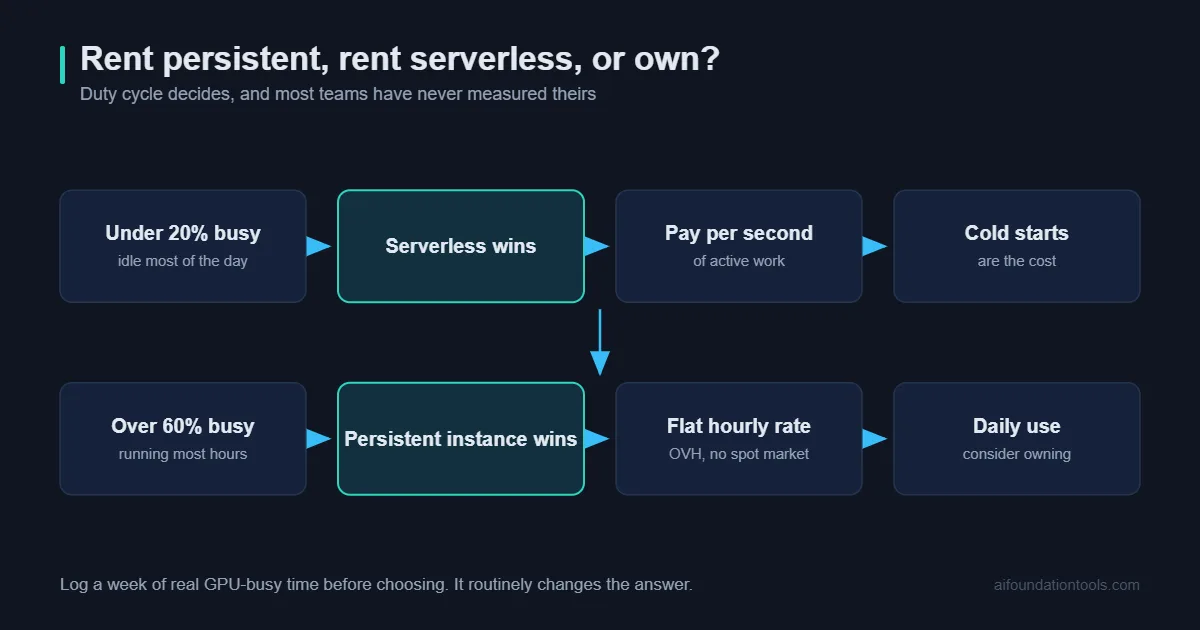
That is the whole trade in one sentence. OVH is cheaper per hour of GPU existing. Serverless is cheaper per hour of GPU working. Which one wins depends on your duty cycle, and most teams guess wrong about their own.
A rough rule from the shape of the pricing: if your GPU is busy more than about half the time, a persistent instance wins. Below roughly twenty percent utilisation, serverless wins comfortably. Between those, measure rather than assume.
The Data Sovereignty Argument
This is the reason OVH exists as a serious option, and it deserves more than a bullet point.
OVHcloud is European, operates European data centres, and is not subject to the US CLOUD Act in the way an American provider is. For organisations handling EU personal data, health records, or anything under a contract that specifies where processing happens, that is not a preference. It is a requirement that removes most of the alternatives from the list.
Being honest about the limits: sovereignty is a legal and contractual property, not a technical one. It does not make your data more secure, and it does not mean your model is private from OVH. It means the jurisdiction is different. If that is what your compliance team needs, an OVH GPU server solves a problem that no amount of encryption on AWS will.
If you are a solo developer fine-tuning a model on public data, this section is irrelevant to you and you should choose on price and availability instead.
What OVH Does Well
Pricing you can put in a spreadsheet. Flat, published, per-second billing, no termination fees. You can forecast a month of an OVH GPU server without a calculator or a sales call, which sounds trivial until you have tried to forecast an AWS bill.
Owned infrastructure. OVH builds its own servers and runs its own data centres. That shows up as lower prices and, less obviously, as a company that can actually tell you where a machine is.
No egress ambush. Data transfer costs have historically been where cloud bills go wrong. OVH is far more generous here than the hyperscalers, and if you are moving datasets or model weights regularly that difference compounds.
Real data centre GPUs. H100s and L40S cards with ECC memory and proper licensing, rather than consumer cards in a rack. For production work that matters legally as well as technically.
Where It Frustrates People
Fair is fair, and the complaints are consistent enough to be worth stating plainly.
No spot instances. If your training job can tolerate interruption, you are leaving a large discount on the table by not being somewhere that offers preemptible capacity.
Slower to the newest silicon. The hyperscalers and the specialist GPU clouds get new cards first. If you need whatever launched last quarter, an OVH GPU server will disappoint you.
Availability varies by region. The instance you want is not always in the data centre you want. Check before you plan around it.
Support has a reputation. Community sentiment on OVH support is mixed, and has been for years. For a team with its own operations capability this is survivable. For a team expecting hand-holding, it is a genuine risk worth pricing in.
The console is functional rather than delightful. Everything works. Nothing is designed to impress you.
Who an OVH GPU Server Suits
A good fit: European companies with data residency obligations. Teams running sustained training or batch inference where utilisation is high. Anyone who needs to forecast infrastructure cost accurately. Research groups on fixed grant budgets.
A poor fit: Startups wanting to burst to fifty GPUs for an afternoon. Inference workloads that idle most of the day. Teams who need the newest hardware as a competitive matter. Anyone without operations skills who wants a managed experience.
Configurations and Where to Start
| If you are | Start with | Why | |
|---|---|---|---|
| Fine-tuning 7B to 13B models | Single L40S | 48GB handles it, and roughly $1.65/hr is the cheapest sensible entry | Check price |
| Serving a 70B model | Single H100 80GB | Fits quantised with context to spare | Check price |
| Training from scratch | 4x H100 | 320GB aggregate, no per-GPU premium | Check price |
| Running continuously | Bare metal GPU | Monthly contract beats hourly above roughly 60% utilisation | Check price |
Start on the smallest instance that fits your model in memory. Scaling up on an OVH GPU server takes minutes. Discovering you have paid for four H100s to run a job that fitted on one L40S takes a month and an invoice.
The Rent Versus Buy Maths
Worth doing honestly, because the answer surprises people in both directions.
An L40S at roughly $1.65 per hour costs about $1,200 a month if you leave it running continuously. A workstation with a 24GB consumer card costs somewhere around $3,000 to $4,000 once. On pure hours, owning breaks even in about three months.
That comparison is not fair, and here is why. The L40S has 48GB, ECC memory and a data centre licence. Your workstation has 24GB, no ECC, and consumer terms. They run different workloads. And the workstation is a fixed asset that depreciates and cannot be scaled down when the project pauses.
The honest framing: own the hardware for daily development work, rent an OVH GPU server for the jobs that exceed it. Most teams that do only one of the two are paying for it somewhere. Our guides on how much VRAM you actually need and building an AI workstation cover the owned half of that split.
Getting an OVH GPU Server Running
The first hour is where most of the avoidable cost happens, so it is worth walking through.
Pick the region before the instance. If data residency is your reason for being here, this is the decision that matters and it is not changeable later without moving everything. Gravelines and Roubaix are the usual European choices.
Choose an image with drivers already installed. OVH offers images with NVIDIA drivers and CUDA preinstalled. Take one. Installing drivers by hand on a metered instance is paying EUR 2.80 an hour for the privilege of fighting a kernel module.
Attach storage separately from the instance. Block storage persists when the instance does not. Put your datasets and checkpoints there, and you can destroy an OVH GPU server the moment a job finishes without losing anything.
Set a billing alert immediately. Before you run anything. This is the single highest-value five minutes in cloud GPU work.
Test with the smallest instance first. Get your pipeline working end to end on an L40S, confirm it runs, then scale to H100s for the real job. Debugging on the expensive instance is a habit that costs real money.
What Performance to Expect
We have not benchmarked an OVH GPU server ourselves, so what follows is what the hardware does generally rather than what we measured on their fleet.
An H100 with 80GB handles a 70B model at 4-bit quantisation comfortably, with room for meaningful context. Full-precision 70B needs more than one card. Fine-tuning a 7B to 13B model with LoRA fits on a single L40S without drama.
The variable nobody quotes is interconnect. On multi-GPU instances, whether cards talk over NVLink or over PCIe changes model-parallel training throughput substantially. If you are planning distributed training rather than running four independent jobs, confirm the topology with OVH before you commit to a configuration. This is the question most likely to invalidate a plan built from spec sheets.
Storage throughput matters more than people expect for training. If your data loader cannot keep the GPU fed, you are paying H100 rates for a card that is waiting. Test the pipeline on cheap hardware before assuming the expensive hardware is the bottleneck.
5 Mistakes Renting Cloud GPUs
1. Leaving instances running. The most expensive mistake in cloud GPU work, by a wide margin. A forgotten H100 over a weekend is roughly EUR 130. Set billing alerts on day one.
2. Sizing on model parameters alone. Context length and batch size eat VRAM aggressively. A 70B model at long context does not fit where a 70B model at short context does.
3. Not measuring your duty cycle first. The persistent-versus-serverless decision depends on a number most teams have never calculated. Log a week of actual GPU-busy time before choosing.
4. Ignoring storage and transfer. The GPU rate is the headline. Datasets, checkpoints and egress are the part that quietly doubles a small bill.
5. Treating the first month as typical. Setup month is always atypical. Judge the cost of an OVH GPU server on month three.
Frequently Asked Questions About OVH GPU Servers
Is an OVH GPU server cheaper than AWS? On published list rates for comparable GPUs, generally yes, and egress is markedly cheaper. Against heavily discounted enterprise commitments the gap narrows.
Can I use consumer GPUs there? No, and that is deliberate. The instances use data centre cards, which is what NVIDIA’s licensing requires for this use.
Does it offer spot or preemptible pricing? Not currently. If interruptible discounts matter to you, this is the wrong provider.
How fast can I get an instance? Minutes through the console or API, subject to regional availability of the specific instance type.
Is it good for inference? For steady inference with high utilisation, yes. For spiky traffic that idles, a serverless provider will cost you less.
What about the 2021 Strasbourg fire? A data centre fire destroyed customer data, and some customers had no backups. OVH has changed practices since. The lesson generalises: your backup strategy is yours regardless of provider.
Verdict
An OVH GPU server is a straightforward, fairly priced way to rent real data centre GPUs, and the clear answer if EU data residency is a requirement rather than a preference.
It is not the cheapest possible way to run a GPU, because it has no spot market. It is not the most elastic, because instances persist. It will not have the newest card first. What it has instead is a price you can predict, hardware it actually owns, and a jurisdiction that satisfies European compliance teams.
Start with a single L40S, measure your real utilisation for a fortnight, and only then decide whether you should be on an H100, on bare metal, or on a serverless provider instead. That measurement is worth more than any comparison table, including this one.
Sources and Further Reading
Pricing above is taken from OVHcloud’s published rates and third-party trackers in mid-2026 and changes without notice. Verify before purchasing.
- OVHcloud Public Cloud GPU
- OVHcloud H100 instances
- OVHcloud L40S instances
- GPU Tracker, OVHcloud rates
- NVIDIA H100 specifications
Related on this site: how much VRAM you need, building a home AI server, and running a local AI agent.


